Last Updated: June 2026
Reading Time: Approximately 35 Minutes
Difficulty Level: Beginner
Suitable For: Salaried Employees, Retired Employees, Job Changers, EPF Members
Quick Answer
Yes, you can withdraw your Provident Fund (PF) amount online through the Employees’ Provident Fund Organisation (EPFO) portal if your Universal Account Number (UAN) is active and your Aadhaar, PAN, and bank account are linked and verified. After logging in to the EPFO Member Portal, you can submit an online claim under Online Services > Claim (Form-31, Form-19 & Form-10C). Depending on your eligibility and the type of claim, the amount is generally credited to your registered bank account within 7 to 15 working days.
However, before submitting a claim, you should verify your KYC details, understand the applicable withdrawal rules, know whether tax will be deducted, and choose the correct claim form. Making even a small mistake—such as an incorrect bank account number or missing exit date—can delay or reject your claim.
This guide explains every step of the online PF withdrawal process in detail, along with eligibility rules, withdrawal limits, required documents, taxation, troubleshooting, and expert tips to help you receive your EPF money without delays.
At a Glance: Online PF Withdrawal
| Particular | Details |
|---|---|
| Facility Available | Yes |
| Portal | EPFO Member Portal |
| Mobile Option | UMANG App |
| Aadhaar Required | Yes |
| UAN Required | Yes |
| PAN Required | Required in many cases |
| Bank Account | Aadhaar-linked and verified |
| Claim Forms | Form 19, Form 31, Form 10C |
| Processing Time | Usually 7–15 working days |
| OTP Verification | Required |
| Employer Approval | Depends on claim type and KYC status |
| Claim Tracking | Available online |
| Charges | No fee |
What Is EPF?
The Employees’ Provident Fund (EPF) is one of India’s largest retirement savings schemes designed to provide financial security to salaried employees after retirement or during emergencies. It is managed by the Employees’ Provident Fund Organisation (EPFO) under the Ministry of Labour and Employment, Government of India.
Every month, both the employee and employer contribute a fixed percentage of the employee’s basic salary and dearness allowance to the EPF account. These contributions earn annual interest declared by the EPFO and accumulate over the employee’s working life.
The primary objective of EPF is to encourage disciplined long-term savings while also offering financial support during specific life events such as medical emergencies, higher education, marriage, home purchase, home construction, unemployment, and retirement.
Unlike ordinary savings accounts, EPF combines compulsory savings with government-regulated benefits, making it one of the safest retirement investment options for salaried individuals.
Key Features of EPF
Retirement Savings
EPF helps employees build a retirement corpus through regular monthly contributions and annual interest.
Government-Regulated Scheme
The scheme is administered by the EPFO, ensuring transparency, standardized rules, and legal protection for members.
Attractive Interest
EPFO announces the interest rate every financial year, and the accumulated balance continues to earn compound interest.
Employer Contribution
Unlike many savings options, employers also contribute to the employee’s EPF account, helping the retirement corpus grow faster.
Online Access
Members can access their EPF accounts online through the UAN Member Portal and the UMANG app to check balances, download passbooks, transfer accounts, update KYC details, and submit withdrawal claims.
What Is PF Withdrawal?
PF withdrawal refers to the process of claiming money accumulated in your Employees’ Provident Fund account.
Depending on your eligibility, you may withdraw:
- The complete EPF balance
- A partial amount
- Pension benefits
- Advance for specific purposes
- Final settlement after leaving employment
The amount received depends on factors such as:
- Length of service
- Reason for withdrawal
- Current employment status
- Applicable EPFO rules
- Type of withdrawal selected
How Does the EPF System Work?
Understanding how EPF works makes the withdrawal process much easier.
Step 1: Monthly Salary Contribution
Every month:
- Employee contributes a fixed percentage of basic salary plus dearness allowance.
- Employer also contributes a matching amount.
These contributions are deposited into your EPF account.
Step 2: Interest Is Added
EPFO announces an annual interest rate.
Interest is credited to your accumulated balance every year, allowing your savings to grow through compounding.
Step 3: Contributions Continue Throughout Employment
As long as you remain employed in an EPF-covered establishment, monthly contributions continue to accumulate.
Whenever you change jobs, your existing PF account can be transferred instead of withdrawn.
Step 4: Withdrawal or Transfer
When eligible, you can either:
- Transfer your PF to a new employer.
- Make a partial withdrawal.
- Withdraw the entire balance after fulfilling the required conditions.

Can You Withdraw PF Amount Online?
Yes.
The EPFO allows eligible members to withdraw their PF amount entirely online without visiting the regional office.
The online claim facility has made the withdrawal process significantly faster, more transparent, and paperless.
Instead of submitting physical forms, members can now complete the entire process using the EPFO Member Portal or the UMANG app.
Advantages of Online PF Withdrawal
Faster Processing
Online claims are generally processed more quickly than offline applications.
No Physical Forms
There is no need to visit the EPFO office or submit paper documents in most cases.
Real-Time Claim Tracking
Members can monitor the status of their claim online at every stage.
Secure OTP Authentication
Identity verification through Aadhaar-linked mobile OTP enhances security.
Direct Bank Transfer
The approved amount is credited directly to the registered bank account.
Reduced Documentation
Most member details are fetched automatically from the EPFO database if KYC is complete.
Can Everyone Withdraw PF Online?
No.
Only members who satisfy EPFO’s eligibility conditions can submit an online claim.
Meeting the eligibility requirements before applying helps prevent claim rejection and unnecessary delays.
Benefits of Online PF Withdrawal
The digital claim process offers several advantages compared to the traditional offline method.
Convenience
The claim can be submitted from home using a computer or smartphone.
Transparency
Applicants can monitor every stage of claim processing online.
Faster Verification
Digital KYC verification speeds up approval.
Reduced Errors
Most personal details are automatically populated from EPFO records.
Paperless Process
No need to submit multiple physical forms in many cases.
Time Saving
Most claims can be completed within a few minutes if all records are updated.
Types of PF Withdrawal
EPFO allows different types of withdrawals depending on the member’s circumstances.
Choosing the correct withdrawal type is essential because each category has different eligibility conditions, withdrawal limits, and documentation requirements.
| Withdrawal Type | Purpose | Full or Partial |
| Final Settlement | After leaving employment | Full |
| Partial Withdrawal | Specific approved purposes | Partial |
| Medical Advance | Medical treatment | Partial |
| Marriage | Marriage expenses | Partial |
| Higher Education | Education expenses | Partial |
| Home Purchase | Buying land or house | Partial |
| Home Construction | Construction of house | Partial |
| Home Renovation | House repairs | Partial |
| Home Loan Repayment | Repayment of housing loan | Partial |
| Retirement | Retirement benefits | Full |
| Pension Withdrawal | EPS amount | Depends on eligibility |
| Permanent Disability | Financial support | Full/Partial |
| Natural Calamity | Emergency assistance | Partial |
| Factory Lockout | Financial assistance | Partial |
| Unemployment | Financial support | Partial or Full |
Final Settlement PF Withdrawal
This option allows a member to withdraw the complete EPF balance after fulfilling the prescribed conditions.
Generally, this applies after:
- Retirement
- Permanent migration abroad (subject to rules)
- Remaining unemployed for the prescribed period
- Permanent disability
Partial PF Withdrawal
Partial withdrawal allows members to withdraw only a portion of their EPF balance without closing the account.
This facility is available only for specific purposes approved under EPFO rules.
Examples include:
- Medical treatment
- Marriage
- Education
- House purchase
- Home renovation
- Home loan repayment
- Natural disasters
Pension Withdrawal
Apart from the EPF balance, eligible members may also claim benefits under the Employees’ Pension Scheme (EPS), subject to the required service period and applicable rules.
Complete Eligibility Criteria for Online PF Withdrawal

Before applying, ensure you satisfy the eligibility conditions prescribed by EPFO.
Eligibility for Final PF Withdrawal
You may generally become eligible if:
- You have retired.
- You have reached the prescribed retirement age.
- You remain unemployed for the required period after leaving your job.
- You permanently migrate abroad (subject to applicable rules).
- You become permanently disabled.
Eligibility for Partial Withdrawal
Partial withdrawal depends on:
- Purpose of withdrawal
- Number of years of service
- Available PF balance
- Compliance with EPFO rules
Each purpose has separate conditions, which will be explained later in this guide.
Eligibility for Medical Withdrawal
Medical withdrawals are available for:
- Self
- Spouse
- Children
- Parents (subject to prevailing EPFO provisions)
Certain medical withdrawals do not require a minimum service period.
Eligibility for Marriage Withdrawal
Members may withdraw PF for:
- Their own marriage
- Son’s marriage
- Daughter’s marriage
- Brother’s marriage
- Sister’s marriage
Specific service requirements apply.
Eligibility for Higher Education
Withdrawal may be permitted for:
- Self
- Son
- Daughter
Eligible educational expenses include higher education after the prescribed academic level.
Eligibility for Home Purchase
Members may become eligible for withdrawal for purchasing:
- Residential plot
- House
- Flat
Subject to service period, ownership conditions, and other EPFO rules.
Eligibility for Home Construction
EPF funds may also be used for constructing a residential house on an eligible plot, subject to applicable conditions.
Eligibility for Home Renovation
Members who already own a residential property may be eligible for a partial withdrawal to renovate or repair the house after fulfilling specified criteria.
EPF Withdrawal Eligibility & Amount Calculator
Check how much PF you may withdraw based on your PF balance, service period and withdrawal purpose.
Who Cannot Withdraw PF Online?
An online claim may not be possible if:
- UAN is not activated.
- Aadhaar is not linked.
- Bank account is not verified.
- PAN details are missing where required.
- Mobile number linked with Aadhaar is inactive.
- KYC is incomplete.
- Employer has not updated exit details (where applicable).
- Personal details do not match official records.
- Member does not satisfy withdrawal conditions.
Documents Required for Online PF Withdrawal
Although the online process is paperless in most situations, certain documents and verified records are essential.
| Document | Purpose |
| UAN | Member identification |
| Aadhaar Card | Identity verification |
| PAN Card | Tax compliance |
| Aadhaar-linked Mobile Number | OTP authentication |
| Bank Passbook | Account verification |
| IFSC Code | Electronic transfer |
| Cancelled Cheque (if required) | Bank confirmation |
| Employer Details | Employment verification |
| Service Information | Eligibility determination |
| Date of Exit | Final settlement claims |
Why Each Document Is Important
UAN
The Universal Account Number acts as your permanent EPF identity throughout your career.
Aadhaar
Aadhaar is used for:
- Identity verification
- OTP authentication
- Online claim validation
PAN
PAN helps determine TDS applicability and tax compliance.
Bank Account
The withdrawal amount is transferred only to the verified bank account registered with EPFO.
Incorrect bank details remain one of the most common reasons for claim delays.
Mobile Number
Your Aadhaar-linked mobile number is required for receiving OTP during claim submission.
KYC Requirements Before PF Withdrawal
Your Know Your Customer (KYC) details should be fully updated and approved.
Verify that the following information matches across all records:
- Name
- Date of Birth
- Father's Name
- Aadhaar
- PAN
- Bank Account Number
- IFSC Code
- Mobile Number
Even a minor mismatch—such as a spelling difference in your name—can result in claim rejection or additional verification.
Before Applying: Complete Online PF Withdrawal Checklist
Use this checklist before clicking the Submit Claim button.
Personal Details
- UAN activated
- Aadhaar linked
- PAN linked
- Mobile number active
- Name matches Aadhaar
- Date of birth correct
- Father's name correct
Bank Details
- Bank account verified
- IFSC code correct
- Account active
- Account in your name
Employment Details
- Date of joining correct
- Date of exit updated
- Service history accurate
- Employer details verified
EPFO Portal
- Password available
- OTP accessible
- Internet connection stable
Tax Preparation
- PAN updated
- Form 15G or Form 15H ready if applicable
- Tax implications understood
Final Review
Before submitting your claim, confirm that:
- All KYC records are approved.
- Your Aadhaar-linked mobile number is available to receive OTPs.
- Your bank account can receive electronic transfers.
- The reason for withdrawal matches the claim type you intend to select.
- You have reviewed all details carefully, as incorrect information may delay the settlement process.
Common Terms You Should Know
Understanding the following terms will make the rest of this guide much easier to follow.
EPFO
The Employees' Provident Fund Organisation is the statutory body responsible for administering EPF, EPS, and related schemes.
EPF
Employees' Provident Fund, the retirement savings account funded by contributions from both employee and employer.
EPS
Employees' Pension Scheme, which provides pension benefits to eligible members after meeting specified service conditions.
UAN
The Universal Account Number is a unique identification number assigned to every EPF member. It remains the same even when you change employers.
KYC
Know Your Customer refers to the verification of your identity and banking information. Aadhaar, PAN, and bank account details should be correctly linked with your UAN before submitting an online claim.
IFSC Code
The Indian Financial System Code identifies your bank branch and ensures that the approved PF amount is transferred to the correct account.
Form 19
Used for claiming the EPF balance in eligible cases.
Form 31
Used for partial withdrawals or advances for approved purposes.
Form 10C
Used to claim withdrawal benefits under the Employees' Pension Scheme or obtain a scheme certificate, depending on eligibility.
Step-by-Step Guide to Withdraw PF Amount Online
Once your Universal Account Number (UAN) is activated and all Know Your Customer (KYC) details are approved, you can submit your EPF withdrawal claim entirely online through the EPFO Member Portal. The online process generally takes only a few minutes if all your information is correct.
Before you begin, keep the following details ready:
- UAN number
- EPFO portal password
- Aadhaar-linked mobile number
- Registered bank account
- Stable internet connection
The following sections explain every screen and every option that you will encounter during the claim process.
Step 1: Visit the EPFO Member Portal
Open your preferred web browser and visit the official EPFO Member Portal.

The homepage contains various services for EPF members, employers, and pensioners. To withdraw your PF amount, you need to access the Member Login section.
Expert Tip: Always verify that you are visiting the official EPFO website. Avoid clicking on links received through SMS, WhatsApp, emails, or social media to protect yourself from phishing scams.
Step 2: Log in Using Your UAN
Click on Member UAN/Online Service and enter:
- Universal Account Number (UAN)
- Password
- Captcha Code
Click Sign In.
If you have forgotten your password, use the Forgot Password option to reset it using your Aadhaar-linked mobile number.
Common Login Errors
Invalid Password
This usually occurs when the password is entered incorrectly. Ensure that Caps Lock is off and try again.
UAN Not Activated
If your UAN has not been activated, you must complete the activation process before submitting any claim.
OTP Not Received
This generally happens due to:
- Poor mobile network
- Aadhaar mobile number not updated
- Temporary server issues
Wait for a few minutes and request another OTP if necessary.
Step 3: Verify Your Personal Details
After logging in, navigate to Manage > KYC.
Review the following details carefully:
- Full Name
- Date of Birth
- Aadhaar Number
- PAN Number
- Bank Account Number
- IFSC Code
- Mobile Number
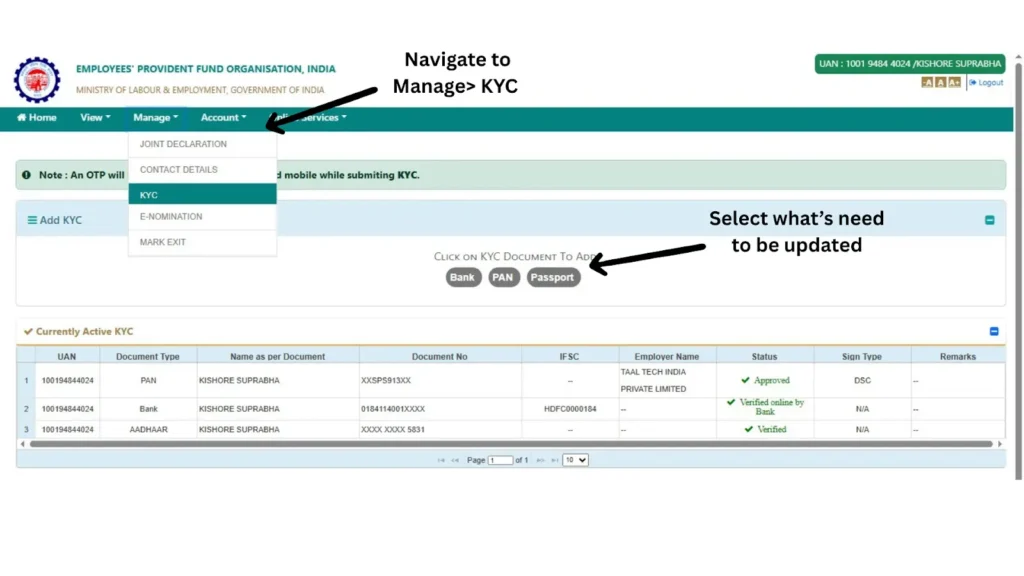
Every document should display an Approved status.
Why Is This Step Important?
Most online PF claims are rejected because of incorrect KYC information rather than eligibility issues.
Common problems include:
- Name mismatch
- Wrong IFSC code
- Closed bank account
- Incorrect PAN
- Aadhaar not verified
Correcting these issues before submitting your claim can save several weeks of processing time.
Step 4: Verify Your Service History
Go to View > Service History.
Here you should verify:
- Date of Joining
- Date of Exit
- Employer Name
- Establishment ID
- PF Account Number
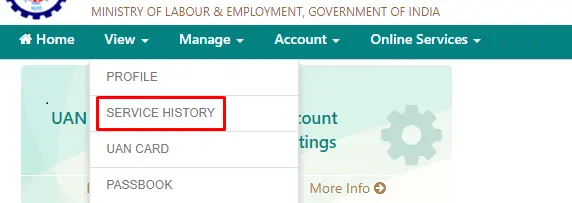
Check the Date of Exit Carefully
If your Date of Exit has not been updated by your previous employer, you may not be able to submit a final settlement claim.
In such cases, contact your employer and request them to update your exit details through the employer portal.
Step 5: Verify Your EPF Passbook
Before withdrawing your PF, it is advisable to check your latest EPF balance.
Navigate to the Passbook Portal and review:
- Employee Contribution
- Employer Contribution
- Pension Contribution
- Interest Credited
- Total Balance

Checking your passbook helps you estimate the amount you may receive and identify any missing contributions before submitting the claim.
Step 6: Navigate to Online Claim Services
Return to the main dashboard.
Click:
Online Services → Claim (Form-31, Form-19 & Form-10C)
This section is used for all online withdrawal requests.

The system automatically checks whether your KYC details are complete before allowing you to proceed.
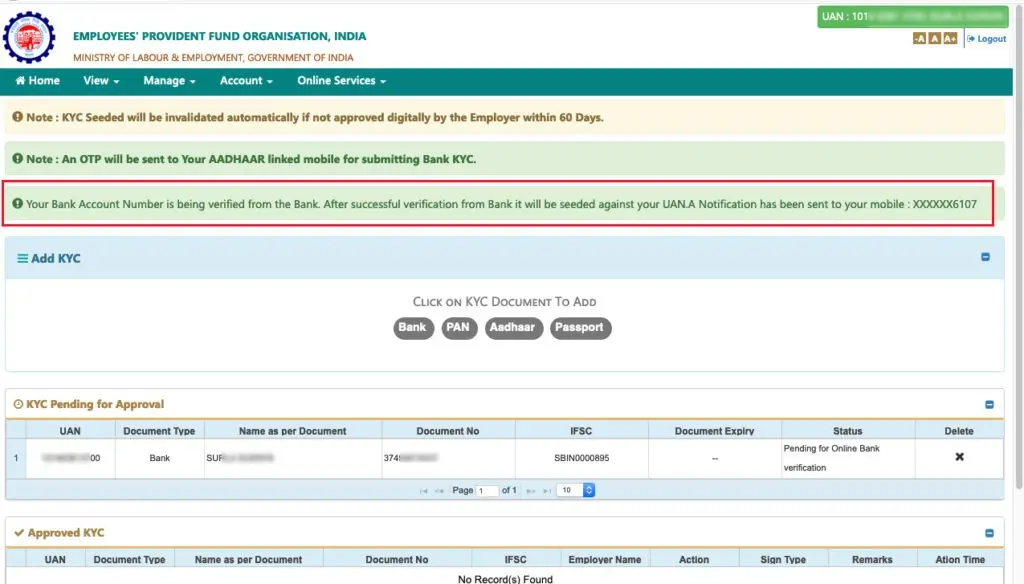
Step 7: Verify Bank Account Details
The portal will ask you to enter the last four or complete digits of your registered bank account number for verification.
Enter the details carefully and click Verify.
Why Does EPFO Verify Your Bank Account?
This security measure ensures that the withdrawal amount is credited only to your registered bank account.
Entering incorrect bank details may delay your claim or result in rejection.
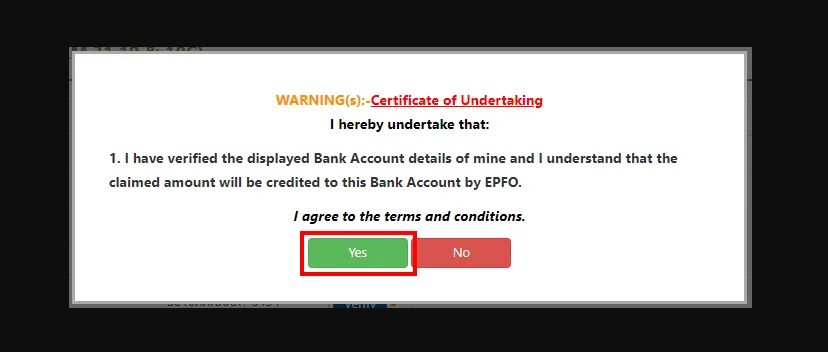
Step 8: Accept the Certificate of Undertaking
After successful bank verification, the portal displays an undertaking confirming that the information provided is accurate.
Read the declaration carefully and click Yes.
This step authorizes EPFO to process your claim using the details available in your account.
Step 9: Select the Appropriate Claim Form
The system will display the claim options available based on your eligibility.
Possible forms include:
- Form 19
- Form 31
- Form 10C

Only the forms applicable to your account will appear.
If a form is missing, it generally means you do not meet the eligibility requirements for that claim.
Understanding Each Claim Form
Form 19
Form 19 is used for claiming the Employees' Provident Fund balance after becoming eligible for final settlement.
Typical situations include:
- Retirement
- Permanent unemployment after the prescribed period
- Other eligible final settlement cases
Form 31
Form 31 is used for partial withdrawals or advances.
It allows members to withdraw funds for approved purposes without closing their EPF account.
Examples include:
- Medical treatment
- Marriage
- Higher education
- Home purchase
- Home construction
- Home renovation
- Home loan repayment
- Natural calamity
Form 10C
Form 10C relates to the Employees' Pension Scheme (EPS).
Depending on your eligibility, it can be used to claim withdrawal benefits or obtain a scheme certificate.
Which Claim Form Should You Choose?
| Situation | Form |
|---|---|
| Final PF Settlement | Form 19 |
| Partial Withdrawal | Form 31 |
| Pension Benefit | Form 10C |
Choosing the wrong form can delay the processing of your application.
Step 10: Select the Reason for Withdrawal
If you select Form 31, you must choose the reason for withdrawal.
Available reasons may include:
- Illness
- Marriage
- Education
- Purchase of land
- Purchase of house
- Construction
- Home renovation
- Home loan repayment
- Disability
- Natural calamity
- Lockout
- Equipment purchase (where applicable under EPFO provisions)
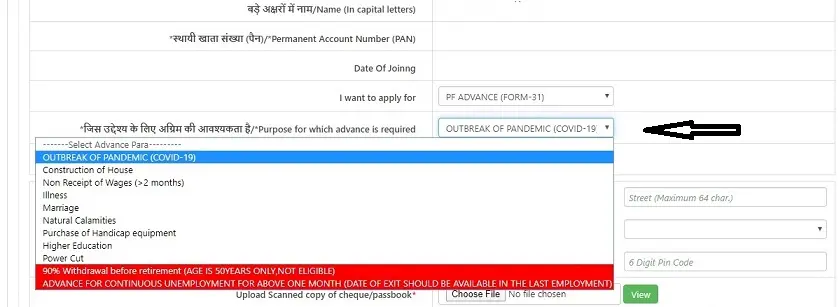
Select the option that accurately matches your requirement.
Providing incorrect information may lead to additional verification or rejection.
Step 11: Enter the Withdrawal Amount
The portal may ask you to enter the amount you wish to withdraw.
The maximum permissible amount depends on:
- Purpose of withdrawal
- Years of service
- Current EPF balance
- Applicable EPFO rules
Always enter an amount within the eligible limit.
Step 12: Upload Supporting Documents (If Required)
Some claim types may require additional documentation.
Examples include:
- Medical certificates
- Property documents
- Loan statements
- Educational admission proof
Ensure that scanned documents are:
- Clear
- Legible
- Complete
- Within the prescribed file size and format limits
Step 13: Aadhaar OTP Verification
The portal will send a One-Time Password (OTP) to your Aadhaar-linked mobile number.
Enter the OTP and submit it.

This serves as your digital signature and confirms that you have authorized the withdrawal request.
Never share your OTP with anyone.
Step 14: Submit Your Claim
After reviewing all the information, click Submit.
The portal generates a claim reference number.
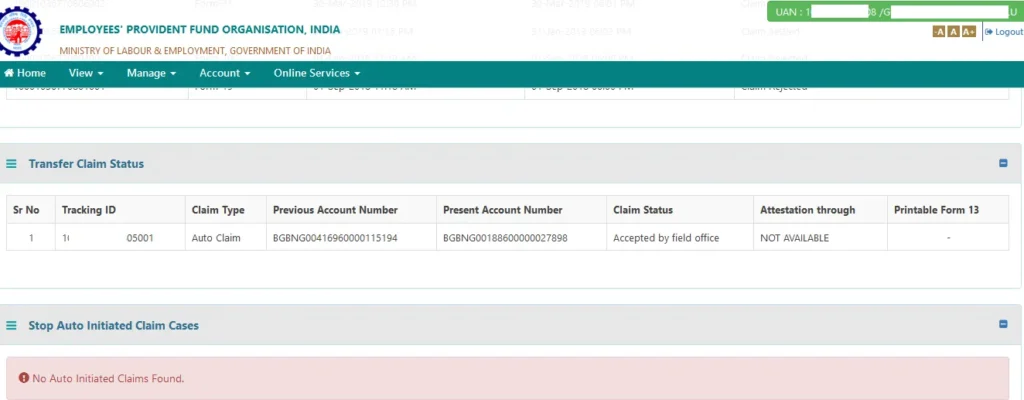
Save the acknowledgement or take a screenshot for future reference.
Step 15: Track Your Claim Status
You can monitor the progress of your claim through:
Online Services → Track Claim Status
Possible statuses include:
- Claim Submitted
- Under Process
- Approved
- Settled
- Rejected

What Happens After You Submit the Claim?
The claim generally goes through the following stages:
- Initial validation of member details
- Verification of KYC records
- Eligibility check
- Employer verification (if applicable)
- EPFO approval
- Bank transfer
- SMS notification
- Claim closure
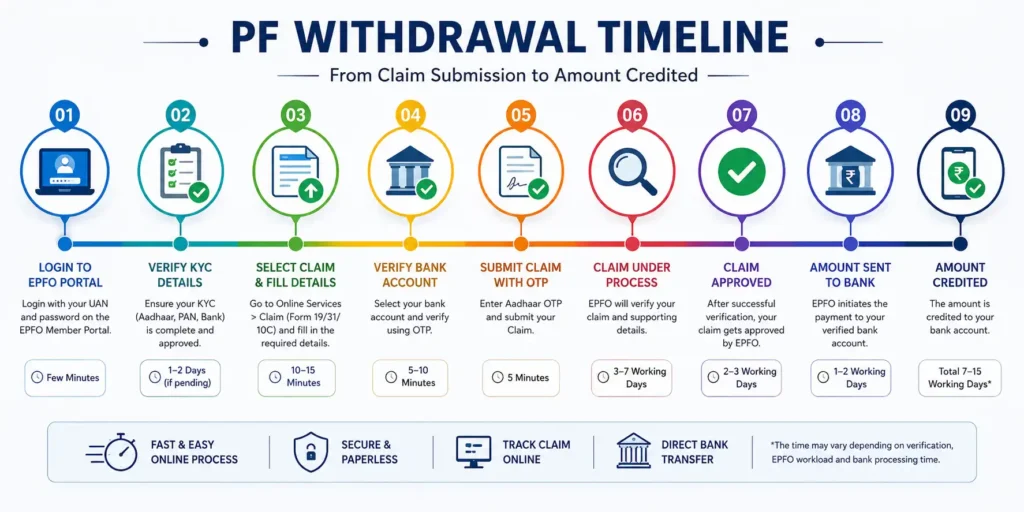
Typical Processing Timeline
| Stage | Approximate Time |
| Claim Submission | Immediate |
| KYC Verification | 1–2 Days |
| Eligibility Review | 2–4 Days |
| Approval | 4–8 Days |
| Bank Transfer | 1–3 Days |
| Total Time | Usually 7–15 Working Days |
Actual timelines may vary depending on claim type, document verification, and EPFO workload.
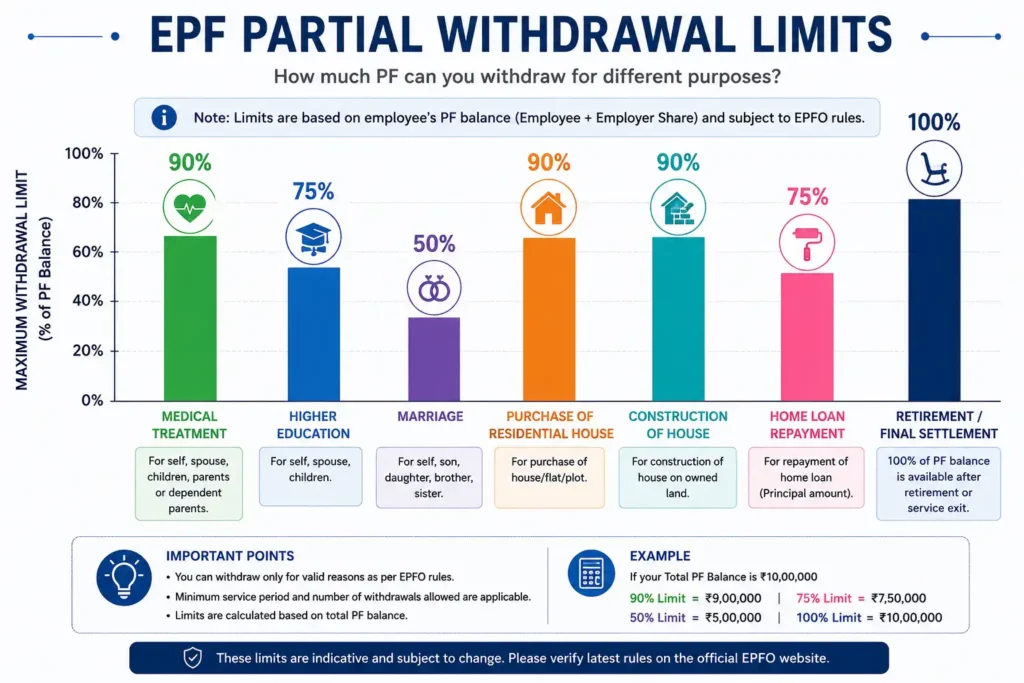
Complete Guide to Partial PF Withdrawal
One of the biggest misconceptions among employees is that PF can only be withdrawn after leaving a job. In reality, EPFO allows partial withdrawals for several life events, provided the prescribed conditions are met.
Medical Treatment
You may apply for a PF advance to cover medical expenses for yourself or eligible family members. This is commonly used during hospitalization, surgery, or treatment of serious illnesses.
Marriage Expenses
EPF members can withdraw a portion of their balance for their own marriage or the marriage of eligible family members, subject to the applicable service conditions.
Higher Education
Members may use EPF funds to support higher education expenses for themselves or their children after meeting the required eligibility criteria.
Purchase of Residential Property
EPFO permits eligible members to withdraw funds for purchasing a residential plot, house, or flat.
Construction of a House
Members who own a suitable plot may use their EPF balance to construct a residential house, subject to EPFO rules.
Home Renovation
A partial withdrawal may also be allowed for repairing, renovating, or improving an existing residential property after fulfilling the prescribed conditions.
Home Loan Repayment
Eligible members may use a portion of their EPF balance to repay an outstanding housing loan.
Natural Calamities
EPFO provides financial assistance through partial withdrawals in the event of notified natural disasters affecting the member.
Expert Tips to Get Your PF Claim Approved Faster
- Complete all KYC updates before applying.
- Ensure your Aadhaar, PAN, and bank details match exactly.
- Verify that your Date of Exit has been updated.
- Check your passbook for the latest contributions.
- Submit the correct claim form for your situation.
- Avoid applying multiple times for the same withdrawal.
- Keep your Aadhaar-linked mobile number active.
- Double-check your bank account number and IFSC code before submission.
- Save the acknowledgement number immediately after applying.
- Monitor your claim status regularly and respond promptly if additional action is required.
Tax Rules on PF Withdrawal
One of the most frequently asked questions by EPF members is whether Provident Fund withdrawal is taxable. The answer depends on several factors, including your total years of continuous service, the reason for withdrawal, your total PF balance, whether your Permanent Account Number (PAN) is linked with your EPF account, and the applicable provisions of the Income Tax Act.
Understanding these rules before submitting your claim can help you avoid unnecessary Tax Deducted at Source (TDS) and prevent complications while filing your Income Tax Return (ITR).
Is PF Withdrawal Taxable?
PF withdrawal is not always taxable. The tax treatment depends on your employment history and the circumstances under which you are withdrawing the amount.
Generally, if you have completed the required continuous service period under the applicable tax rules and meet the prescribed conditions, your EPF withdrawal may qualify for tax exemption. However, if you withdraw before completing the required service period (except in certain exempt situations), the withdrawal may become taxable, and TDS may apply based on the prevailing tax provisions.
Because tax rules can change over time, always verify the latest provisions before submitting your claim.
Factors That Decide Taxability
The following factors determine whether your PF withdrawal is taxable:
Total Years of Continuous Service
The total period of continuous service is one of the most important factors in deciding taxability.
Reason for Withdrawal
Withdrawals due to retirement, permanent disability, business closure, or certain other eligible circumstances may receive different tax treatment than voluntary withdrawals.
Total Withdrawal Amount
The amount you withdraw may affect whether TDS is applicable.
PAN Availability
Providing a valid PAN helps ensure that tax, if applicable, is deducted according to the prescribed rates.
Form 15G or Form 15H
Eligible members may submit the appropriate declaration form to avoid TDS in specific situations, subject to the applicable income tax provisions.
Understanding TDS on PF Withdrawal
TDS stands for Tax Deducted at Source. It is the amount deducted by EPFO before crediting the withdrawal amount to your bank account when the withdrawal attracts tax under the prevailing rules.
Many members confuse TDS with final tax liability. These are not the same.
TDS is only an advance tax deduction. Your final tax liability is determined when you file your Income Tax Return.
When Can TDS Be Deducted?
TDS may be deducted depending on:
- Length of continuous service
- Total withdrawal amount
- Availability of PAN
- Applicable income tax provisions
How to Reduce the Chances of TDS
You may reduce or avoid unnecessary TDS by:
- Linking your PAN with your UAN.
- Ensuring all KYC details are verified.
- Submitting Form 15G or Form 15H if you are eligible.
- Understanding the applicable tax rules before applying.
What Is Form 15G?
Form 15G is a self-declaration that may be submitted by eligible individuals requesting that no TDS be deducted, provided they satisfy the conditions laid down under the Income Tax Act.
Submitting Form 15G does not automatically make your PF withdrawal tax-free. It only relates to TDS and must be used only if you meet the eligibility requirements.
Who Can Submit Form 15G?
Generally, Form 15G is meant for eligible resident individuals who satisfy the prescribed income conditions under the Income Tax Act.
Always verify your eligibility before submitting the form.
What Is Form 15H?
Form 15H serves a similar purpose to Form 15G but is meant for eligible senior citizens who satisfy the prescribed conditions.
If you are eligible, submitting Form 15H may help prevent TDS on your PF withdrawal where applicable.
Difference Between Form 15G and Form 15H
| Feature | Form 15G | Form 15H |
|---|---|---|
| Intended For | Eligible resident individuals | Eligible senior citizens |
| Purpose | Declaration for non-deduction of TDS (subject to conditions) | Declaration for non-deduction of TDS (subject to conditions) |
| Eligibility | As prescribed under the Income Tax Act | As prescribed under the Income Tax Act |
Should You Submit Form 15G or Form 15H?
Before submitting either form, ask yourself:
- Am I eligible under the Income Tax Act?
- Is my PAN linked with my EPF account?
- Will TDS otherwise apply to my withdrawal?
- Have I reviewed the latest tax rules?
If you are unsure, consider consulting a qualified tax professional.
How to Download Form 15G
You can usually obtain Form 15G from:
- The Income Tax Department portal.
- Your bank's website.
- Certain financial institutions.
Always use the latest version of the form.
Documents Required Along with Form 15G
You may need:
- PAN
- Aadhaar
- EPF details
- Bank account details
- Income declaration (where applicable)
Ensure that all information is accurate before submission.
Will You Have to Pay Income Tax After PF Withdrawal?
Even if TDS is not deducted, you may still need to report the withdrawal while filing your Income Tax Return, depending on the applicable tax laws.
Similarly, if TDS has been deducted, it does not necessarily mean that additional tax is payable. Your final tax liability depends on your total income and the provisions of the Income Tax Act.
PF Withdrawal Processing Time
After submitting an online claim, many members are eager to know when the money will be credited to their bank account.
Although processing times can vary, online claims are generally settled much faster than traditional paper-based applications.
Typical Processing Stages
- Claim submission
- Initial validation
- KYC verification
- Eligibility review
- Employer verification (if applicable)
- EPFO approval
- Payment authorization
- Bank transfer
- SMS confirmation
- Claim closure
Estimated Timeline
| Stage | Approximate Time |
| Claim Submission | Immediate |
| Initial Verification | 1–2 Working Days |
| Eligibility Check | 2–4 Working Days |
| Approval | 4–8 Working Days |
| Payment Processing | 1–3 Working Days |
| Total Time | Usually 7–15 Working Days |
Actual processing time may differ depending on the type of claim, completeness of KYC, verification requirements, and EPFO workload.

Why Is My PF Claim Taking Longer?
Several factors can delay claim processing, including:
- Incorrect Aadhaar details
- Name mismatch
- Incorrect bank account number
- Unverified KYC
- Missing Date of Exit
- Pending employer updates
- Technical issues
- High volume of claims
Reviewing your records before applying can significantly reduce the likelihood of delays.
How to Check PF Withdrawal Status Online
EPFO allows members to monitor the progress of their claim online.
Tracking your claim helps you understand whether it is under process, approved, settled, or requires further action.
Method 1: EPFO Member Portal
After logging in to the EPFO Member Portal:
- Open Online Services.
- Select Track Claim Status.
- Review the latest status.
Possible statuses include:
- Submitted
- Under Process
- Approved
- Settled
- Rejected
Method 2: UMANG App
The UMANG app also provides claim tracking facilities.
After logging in, navigate to the EPFO section and select the claim status option to view the latest updates.
Method 3: SMS Service
Subject to availability and applicable conditions, EPFO also provides certain information through SMS services.
Ensure that your mobile number is correctly linked with your UAN.
Method 4: Missed Call Service
Eligible members may obtain limited EPF information through the EPFO missed call facility if their UAN is activated and KYC is complete.
Understanding Claim Status Messages
Claim Submitted
Your application has been successfully received by EPFO.
Under Process
The claim is currently being verified.
Approved
EPFO has approved your application.
Settled
The payment has been processed and is being transferred or has already been transferred to your bank account.
Rejected
Your claim could not be processed. You should review the rejection reason, correct the issue if possible, and submit a fresh claim where appropriate.
PF Withdrawal Through the UMANG App
The UMANG application allows eligible members to access various EPFO services from their smartphones, including submitting withdrawal claims and checking claim status.
Benefits of Using UMANG
- Mobile-friendly interface
- Easy login
- Claim tracking
- Access to EPF services
- Convenient account management
Basic Steps to Submit a Claim Using UMANG
- Install the UMANG app.
- Log in using your registered credentials.
- Select EPFO services.
- Choose the online claim option.
- Verify your KYC details.
- Select the appropriate claim type.
- Complete OTP verification.
- Submit the application.
EPFO Portal vs UMANG App
| Feature | EPFO Portal | UMANG App |
| Device | Desktop & Mobile Browser | Smartphone |
| Claim Submission | Yes | Yes |
| Claim Tracking | Yes | Yes |
| KYC Access | Yes | Yes |
| User Experience | Detailed | Mobile Optimized |
Both platforms use the same EPFO database. You can choose whichever is more convenient.
Online vs Offline PF Withdrawal
Although online withdrawal is the preferred option, offline withdrawal may still be required in certain situations.
Online Withdrawal
Advantages
- Faster processing
- Paperless
- Convenient
- Real-time tracking
- Direct bank transfer
Limitations
- Requires complete KYC
- Requires Aadhaar-linked mobile number
- Requires active UAN
Offline Withdrawal
Advantages
- Useful when online facilities are unavailable
- May help in exceptional situations
Limitations
- More paperwork
- Longer processing time
- Physical visits may be required
PF Withdrawal After Resignation
Many employees resign from one organization and wonder whether they should withdraw their PF balance immediately.
In many cases, transferring the EPF balance to the new employer instead of withdrawing it can help preserve service continuity and retirement savings. However, if you are eligible for final settlement under the applicable rules, you may choose to withdraw the amount.
Evaluate your long-term financial goals before making this decision.
PF Withdrawal While Still Working
A common misconception is that PF cannot be withdrawn while employed.
In reality, EPFO allows eligible members to make partial withdrawals for approved purposes such as medical treatment, education, marriage, housing, and certain emergencies without closing the EPF account.
PF Withdrawal After Retirement
After retirement, eligible members may apply for final settlement of their EPF balance. Pension benefits under the Employees' Pension Scheme (EPS) may also be available if the prescribed eligibility conditions are satisfied.
PF Withdrawal in Case of Permanent Disability
Members who become permanently disabled may be eligible to withdraw their PF benefits, subject to the applicable EPFO rules and supporting documentation.
PF Withdrawal After the Death of a Member
In the unfortunate event of the death of an EPF member, eligible nominees or legal heirs may claim the accumulated EPF balance and other admissible benefits, subject to the applicable procedures and documentation requirements.
Maintaining updated nominee information in your EPF account can help ensure a smoother settlement process for your family.
PF Withdrawal for NRIs
Members who permanently relocate abroad may be eligible to withdraw their EPF balance, subject to the applicable EPFO provisions and documentation requirements.
The exact eligibility depends on the circumstances of migration and prevailing regulations.
PF Withdrawal for International Workers
International Workers covered under the EPF framework are subject to specific provisions, which may vary depending on applicable Social Security Agreements (SSAs), employment status, and EPFO regulations.
Members falling under this category should carefully review the relevant rules before submitting a claim.
Expert Tips Before You Withdraw Your PF
- Verify your passbook to ensure all contributions are reflected.
- Keep your nominee details updated.
- Review the tax implications before applying.
- Confirm that your bank account is active.
- Check that your Aadhaar, PAN, and UAN details match exactly.
- Avoid withdrawing your EPF unless it is genuinely necessary, as it serves as an important retirement corpus.
- If changing jobs, consider transferring your EPF balance instead of withdrawing it.
- Save copies of your acknowledgement and claim reference number for future reference.
Common PF Withdrawal Problems and Their Solutions

Even if you carefully follow every step while submitting your EPF withdrawal claim, there is still a possibility that your application may be delayed, put on hold, or rejected due to incorrect information, incomplete KYC, employer-related issues, or technical errors.
The good news is that most of these problems can be resolved without visiting the EPFO office if you understand the exact reason behind the issue.
This section explains the most common EPF withdrawal problems, why they occur, and the steps you can take to resolve them.
Top Reasons Why Your PF Withdrawal Claim Gets Rejected
Below are some of the most common reasons why EPFO rejects or delays online claims.
| Reason | Impact | Can It Be Fixed? |
|---|---|---|
| Aadhaar Not Linked | Claim cannot proceed | Yes |
| PAN Not Verified | Tax-related issues | Yes |
| Bank Account Not Verified | Payment fails | Yes |
| Incorrect IFSC Code | Payment rejected | Yes |
| Name Mismatch | Identity verification fails | Yes |
| Date of Birth Mismatch | KYC verification fails | Yes |
| Father's Name Mismatch | Verification delay | Yes |
| Date of Exit Not Updated | Final settlement not allowed | Yes |
| Employer Hasn't Approved Records | Claim pending | Yes |
| Multiple UANs | Service history mismatch | Yes |
| Incomplete KYC | Online claim disabled | Yes |
| Wrong Claim Form Selected | Claim rejected | Yes |
| Invalid Bank Account | Payment failure | Yes |
| Closed Bank Account | Amount cannot be credited | Yes |
| Aadhaar Mobile Number Inactive | OTP verification fails | Yes |
| Technical Error | Temporary delay | Usually |
| Duplicate Claim Submitted | Processing delay | Yes |
| Incorrect Withdrawal Reason | Claim rejected | Yes |
| Invalid Supporting Documents | Additional verification | Yes |
| Signature/Declaration Issue | Claim rejected | Yes |
Problem 1: Aadhaar Is Not Linked with UAN
Aadhaar is one of the most important requirements for online PF withdrawal.
Without Aadhaar verification:
- OTP authentication cannot be completed.
- Identity verification fails.
- Online claim submission is disabled.
How to Fix It
- Log in to the EPFO Member Portal.
- Navigate to Manage > KYC.
- Add your Aadhaar number if it is not already linked.
- Wait for approval.
- Verify that the status changes to Approved before submitting your claim.
Expert Tip
Ensure that the name and date of birth on your Aadhaar exactly match your EPF records. Even a small spelling difference may prevent successful verification.
Problem 2: PAN Is Missing or Not Verified
Although PAN is not mandatory for every claim, it plays an important role in tax compliance.
An unverified PAN may lead to:
- Additional verification.
- Higher TDS where applicable.
- Delays in processing.
Solution
- Update your PAN under Manage > KYC.
- Wait until EPFO approves the PAN details.
- Verify that the status shows Approved.
Problem 3: Bank Account Not Verified
This is one of the most common reasons for claim rejection.
If the registered bank account is:
- Closed
- Frozen
- Incorrect
- In another person's name
the payment cannot be processed.
How to Fix It
Update the correct bank account details in your EPF account.
Verify:
- Account Number
- IFSC Code
- Account Holder Name
All details should match your bank records exactly.
Problem 4: Incorrect IFSC Code
Even if the bank account number is correct, an incorrect IFSC code may cause payment failure.
Solution
Check the IFSC code directly from:
- Bank passbook
- Cancelled cheque
- Official bank website
Never rely on old IFSC codes after a bank merger.
Problem 5: Name Mismatch
One of the biggest reasons for claim rejection is inconsistency in the member's name.
Example:
EPF Record:
Rahul Kumar
Aadhaar:
Rahul Kumar Sharma
This small difference may trigger verification issues.
How to Correct Name Mismatch
If your name differs across documents:
- Update your Aadhaar if it contains an error.
- Or request correction in EPF records through the prescribed EPFO process.
- Wait until the corrected information is reflected before applying again.
Problem 6: Date of Birth Mismatch
The date of birth should be identical across:
- Aadhaar
- PAN
- EPF records
Incorrect dates may prevent successful KYC verification.
Solution
Apply for correction using the appropriate EPFO facility and supporting documents.
Problem 7: Father's Name Mismatch
Although many members overlook this field, mismatched parental details can also create verification problems.
Always ensure consistency across all official records.
Problem 8: Date of Exit Is Missing
This is one of the most common issues faced by employees who recently resigned.
Without the Date of Exit:
- Final settlement cannot usually be processed.
- The system assumes you are still employed.
How to Check Your Date of Exit
Login to your EPF account.
Navigate to:
View → Service History
Verify whether the exit date appears correctly.
How to Update Date of Exit
If the exit date is missing:
Option 1: Contact Employer
Request your previous employer to update the Date of Exit through the employer portal.
This is usually the fastest solution.
Option 2: Update Online (Where Available)
Eligible members may be able to update the Date of Exit themselves through the Member Portal if the facility is available and the required conditions are met.
Follow the instructions displayed in your EPF account.
Problem 9: Employer Has Not Updated Employment Details
Sometimes employers fail to update:
- Date of Joining
- Date of Exit
- Salary details
- Service records
This can delay claim processing.
What Should You Do?
First, contact the HR department.
Request them to:
- Update employment records.
- Approve pending KYC.
- Correct any incorrect details.
Keep written communication for future reference.
Problem 10: Multiple UANs
Changing jobs without properly transferring your EPF account may sometimes result in multiple Universal Account Numbers.
Multiple UANs can create:
- Service history issues
- Balance mismatch
- Claim processing delays
How to Check Multiple UANs
Review your service history carefully.
If you notice more than one UAN linked to your employment history, you should initiate the prescribed process for merging or deactivating duplicate UANs through EPFO.
How to Merge Multiple UANs
Generally, the process involves:
- Informing EPFO about the duplicate UAN.
- Verifying your employment records.
- Transferring the EPF balance to the active UAN.
- Deactivating the duplicate UAN.
Keep all employment details ready before starting the process.
Problem 11: Wrong Claim Form Selected
Many members accidentally choose the incorrect claim form.
Examples:
- Selecting Form 31 instead of Form 19.
- Selecting pension withdrawal without eligibility.
This often results in claim rejection.
Solution
Understand the purpose of each form before applying.
| Form | Purpose |
|---|---|
| Form 19 | Final EPF Settlement |
| Form 31 | Partial Withdrawal |
| Form 10C | Pension-related benefits |
Problem 12: Invalid Supporting Documents
Some withdrawal categories require supporting documents.
Poor-quality scans may delay verification.
Avoid:
- Blurry images
- Cropped documents
- Password-protected files
- Incorrect file formats
Problem 13: Aadhaar Mobile Number Is Not Active
OTP verification depends on the mobile number linked with Aadhaar.
If the number is inactive:
- OTP will not be received.
- Claim cannot be authenticated.
Solution
Update your mobile number in Aadhaar through the prescribed process before applying.
Problem 14: Duplicate Claims
Submitting multiple claims for the same withdrawal request is not recommended.
This may result in:
- Confusion
- Processing delays
- Manual verification
Always wait for the existing claim to be processed before submitting another one unless instructed otherwise by EPFO.
Problem 15: Technical Errors
Sometimes portal-related issues are beyond your control.
Examples include:
- Server timeout
- Website maintenance
- OTP delay
- Session expiration
Solution
- Try during non-peak hours.
- Use a stable internet connection.
- Clear browser cache.
- Try another browser if needed.
Employer Is Not Approving My PF Claim. What Should I Do?
Most online claims today do not require extensive employer intervention if KYC is complete. However, employer-related issues may still arise, particularly when service details or exit information are incomplete.
If your employer is not cooperating:
Step 1: Contact HR
Explain the issue politely and request the required update.
Step 2: Send an Email
Maintain a written record of your request.
Include:
- Employee ID
- UAN
- Date of Joining
- Date of Exit
- Nature of the issue
Step 3: Follow Up
If there is no response within a reasonable period, send a reminder.
Step 4: Escalate Internally
Contact the HR Manager or Payroll Manager if your initial request remains unresolved.
How to File an EPFO Grievance
If your issue is not resolved by your employer, you can submit a grievance through the EPFO grievance redressal system.
Situations Where You Should File a Grievance
- Employer not updating exit date
- Claim pending for an unusually long time
- Incorrect KYC
- Payment not received
- Claim wrongly rejected
- Service history errors
- Multiple UAN issues
Information You Should Keep Ready
- UAN
- PF Account Number
- Aadhaar Number
- Claim Reference Number (if available)
- Employer Details
- Relevant supporting documents
Provide a clear and concise description of your issue to help expedite the resolution process.
How to Reapply After PF Claim Rejection
Receiving a rejection does not necessarily mean you have lost your eligibility.
Most rejected claims can be submitted again after correcting the underlying issue.
Step 1: Identify the Exact Rejection Reason
Review the rejection message carefully.
Do not assume the cause.
Step 2: Correct the Error
Examples:
- Update KYC.
- Correct bank details.
- Resolve name mismatch.
- Wait for employer updates.
- Upload valid documents.
Step 3: Verify All Details Again
Before reapplying, double-check:
- Aadhaar
- PAN
- Bank account
- IFSC
- Date of Exit
- Service history
- Withdrawal reason
- Claim form selection
Step 4: Submit a Fresh Claim
After confirming that all issues have been resolved, submit a new online claim.
Expert Checklist Before Reapplying
Use this checklist to improve the chances of approval:
- ✅ UAN activated
- ✅ Aadhaar approved
- ✅ PAN verified
- ✅ Bank account verified
- ✅ Correct IFSC code
- ✅ Date of Exit updated
- ✅ Service history verified
- ✅ Correct claim form selected
- ✅ Supporting documents uploaded (if required)
- ✅ Aadhaar-linked mobile number active
- ✅ No duplicate claim pending
- ✅ All personal details match across documents
By resolving these common issues before reapplying, you can significantly reduce delays and improve the likelihood of your PF withdrawal claim being approved successfully.
Latest EPFO Rules and Updates (2026)
The Employees' Provident Fund Organisation (EPFO) periodically updates its policies, claim procedures, and digital services to improve transparency, reduce paperwork, and speed up claim processing. Before submitting a withdrawal request, it is always advisable to review the latest notifications issued by EPFO, as eligibility criteria, documentation requirements, processing timelines, and online services may change.
Important: Always refer to the latest official EPFO circulars and notifications before making financial decisions, as rules can be revised over time.
Major Improvements in the Online Claim Process
In recent years, EPFO has significantly improved the digital claim experience by introducing:
- Paperless online claim submission
- Aadhaar-based authentication
- Online KYC verification
- Digital claim tracking
- Direct bank account credit
- Mobile access through the UMANG app
- Faster claim processing for eligible members
- Improved grievance redressal system
These enhancements have reduced the need to visit EPFO offices for most routine withdrawal requests.
Best Practices Before Withdrawing Your PF
Withdrawing your PF should not be treated as a routine financial decision. Since EPF is primarily a retirement savings scheme, every withdrawal reduces your long-term retirement corpus.
Before submitting your claim, consider the following best practices.
Evaluate Whether You Really Need the Money
Ask yourself:
- Is this an emergency?
- Can the expense be managed through savings?
- Is there a lower-cost financing option available?
- Will withdrawing PF affect my retirement planning?
Using EPF funds for genuine emergencies is generally more beneficial than withdrawing them for discretionary spending.
Consider PF Transfer Instead of Withdrawal
If you have changed jobs and joined another EPF-covered organization, transferring your existing PF balance to the new employer's account often helps maintain continuous service history and preserves long-term retirement savings.
Keep All KYC Details Updated
Before submitting any claim, ensure that your:
- Aadhaar
- PAN
- Bank account
- Mobile number
- Name
- Date of Birth
are accurate and approved.
Download Your Latest Passbook
Review your passbook to verify:
- Employee contributions
- Employer contributions
- Interest credit
- Total balance
If you notice missing contributions, resolve the issue before filing your claim.
Review Tax Implications
Understand whether your withdrawal may attract tax or TDS under the prevailing provisions before submitting your application.
Best Practices After Submitting Your Claim
Many applicants repeatedly log in to the EPFO portal immediately after submitting the claim, expecting instant approval.
Instead, follow these practices.
Save Your Acknowledgement
After successful submission:
- Save the acknowledgement number.
- Take a screenshot of the confirmation page.
- Keep a PDF copy if available.
This information may be required if you need to raise a grievance later.
Track Claim Periodically
Checking the claim status once every few days is generally sufficient.
Frequent login attempts do not accelerate processing.
Monitor Your Registered Bank Account
Sometimes the payment is credited before the member notices the status change.
Regularly check your bank account during the expected settlement period.
Preserve Important Records
Maintain copies of:
- Claim acknowledgement
- Passbook
- Bank statement
- EPFO communication
- Employer correspondence
These documents may prove useful in the future.
Common PF Withdrawal Myths vs Facts
Many misconceptions surrounding EPF withdrawal lead to unnecessary confusion. The following table clarifies some of the most common myths.
| Myth | Reality |
|---|---|
| PF can only be withdrawn after retirement. | Eligible members may also make partial withdrawals for approved purposes. |
| Employer always has to approve every claim. | Depending on KYC status and the type of claim, many online claims are processed without extensive employer intervention. |
| PF withdrawal is always taxable. | Tax treatment depends on the applicable rules and individual circumstances. |
| Online withdrawal is unsafe. | The EPFO online system uses Aadhaar-based authentication and secure verification processes. |
| You can use any bank account to receive PF. | The registered and verified bank account should be used. |
| You lose your PF if you change jobs. | In most cases, you can transfer your EPF balance to the new employer. |
| Multiple claims speed up processing. | Duplicate claims may delay processing. |
| OTP can be shared with customer support. | Never share OTP with anyone. EPFO never asks for your OTP over phone calls. |
EPF Security Tips: Protect Yourself from Fraud
With the increasing popularity of online PF withdrawal, fraudsters have also become more active. They may attempt to steal personal information through fake websites, phishing emails, phone calls, or messages.
Following basic security practices can help protect your EPF account.

Always Use the Official EPFO Portal
Avoid clicking on unknown links received through:
- SMS
- Telegram
- Social media
Instead, type the official EPFO website address directly into your browser.
Never Share Your OTP
Your Aadhaar OTP or login credentials should never be shared with:
- Agents
- Brokers
- Consultants
- Callers claiming to represent EPFO
- Unknown individuals
EPFO does not ask for your OTP over the phone.
Keep Your Mobile Number Updated
Since OTP verification is an important part of the online claim process, ensure that your Aadhaar-linked mobile number remains active.
Use a Strong Password
Choose a password that combines:
- Uppercase letters
- Lowercase letters
- Numbers
- Special characters
Avoid using easily guessable information such as your date of birth or mobile number.
Log Out After Using the Portal
If you access your EPF account from a public or shared computer, always log out after completing your session.
Real-Life Case Studies
The following examples illustrate how different members may approach PF withdrawal under various circumstances. These examples are for educational purposes only.
Case Study 1: Employee Changing Jobs
Profile
- Age: 28 years
- Private sector employee
- Switched to another company after four years
Situation
The employee considered withdrawing the accumulated PF balance after resignation.
Recommended Approach
Since the individual joined another EPF-covered organization, transferring the existing balance to the new employer's EPF account helped preserve continuous service and retirement savings.
Key Learning
If you continue working under EPF-covered employment, transferring your balance may be more beneficial than withdrawing it.
Case Study 2: Medical Emergency
Profile
- Age: 36 years
- Salaried employee
- Required urgent medical treatment for a family member
Situation
Immediate funds were needed to cover hospitalization expenses.
Recommended Approach
The employee applied for a partial PF withdrawal under the applicable medical provisions after ensuring that KYC details were complete.
Key Learning
EPF can provide valuable financial support during genuine medical emergencies.
Case Study 3: Home Purchase
Profile
- Age: 40 years
- Planning to purchase a residential property
Situation
The employee wanted to reduce the housing loan amount by utilizing a portion of the EPF balance.
Recommended Approach
After verifying eligibility under the relevant EPFO provisions, the member applied for a housing-related partial withdrawal.
Key Learning
Understanding withdrawal limits and documentation requirements beforehand can simplify the process.
Case Study 4: Home Renovation
Profile
- Existing homeowner
- Required major repairs and renovation
Situation
The member wanted to upgrade the residential property using available EPF funds.
Recommended Approach
The member reviewed the applicable eligibility conditions, gathered supporting documents, and submitted the appropriate online claim.
Key Learning
Always confirm that your intended purpose falls within the approved withdrawal categories.
Case Study 5: Higher Education
Profile
- Parent planning to fund a child's higher education
Situation
Tuition fees and educational expenses created a financial burden.
Recommended Approach
The member verified eligibility, selected the correct withdrawal category, and completed the online application.
Key Learning
Educational withdrawals can help reduce dependence on high-interest education loans when used responsibly.
Case Study 6: Marriage Expenses
Profile
- Employee planning family marriage expenses
Situation
Additional funds were required for wedding-related costs.
Recommended Approach
The member checked the applicable service requirements before submitting a partial withdrawal request.
Key Learning
Submitting the correct claim type and supporting documents helps reduce processing delays.
Case Study 7: Retirement
Profile
- Age: 60 years
- Completed employment career
Situation
The member wanted to withdraw the accumulated retirement corpus.
Recommended Approach
After confirming eligibility for final settlement, the member submitted the online claim and monitored the status until payment was received.
Key Learning
Review your passbook and KYC details before retirement to ensure a smooth settlement process.
Case Study 8: Claim Rejected Due to Name Mismatch
Profile
- Name differed between Aadhaar and EPF records
Situation
The online claim was rejected during verification.
Resolution
The member corrected the name discrepancy, waited for the records to be updated, and submitted a fresh claim.
Key Learning
Minor spelling differences can delay claim processing.
Case Study 9: Bank Account Error
Profile
- Incorrect account number registered
Situation
Payment could not be credited.
Resolution
The member updated the bank details, completed verification, and reapplied successfully.
Key Learning
Always verify bank details carefully before submitting your application.
Case Study 10: Missing Date of Exit
Profile
- Recently resigned employee
Situation
Final settlement option was unavailable.
Resolution
The previous employer updated the Date of Exit through the employer portal, after which the employee successfully submitted the claim.
Key Learning
Checking your service history immediately after resignation can help identify missing employment records early.
Expert Recommendations
Financial planning experts generally recommend using EPF withdrawals judiciously. Consider the following guidance before making a decision.
Build an Emergency Fund
Maintaining a separate emergency fund equivalent to several months of essential expenses can reduce the need to withdraw your retirement savings during short-term financial difficulties.
Avoid Frequent Withdrawals
Repeated withdrawals reduce the compounding benefit of your retirement corpus.
Whenever possible, preserve your EPF balance for long-term financial security.
Review Your Retirement Goals
Before withdrawing a substantial amount, estimate how the decision may affect your retirement savings and future income needs.
Keep Nominee Details Updated
An updated nominee record helps ensure that eligible family members can access the benefits more smoothly in unforeseen circumstances.
Stay Informed
Regularly review updates published by EPFO to remain aware of changes in withdrawal rules, claim procedures, and digital services.
Official EPFO Resources You Should Use
For accurate and up-to-date information, rely only on official EPFO resources and government platforms. These include:
- EPFO Member Portal
- EPF Passbook Portal
- UMANG App
- EPFO Grievance Management System (EPFiGMS)
- UAN Member Services
- Ministry of Labour and Employment notifications
Avoid using unofficial websites for sensitive activities such as submitting claims, updating KYC, or entering personal information.
Frequently Asked Questions (FAQs)
Yes. Eligible members can apply for partial PF withdrawal while still employed for approved purposes such as medical treatment, higher education, marriage, home purchase, home construction, home renovation, home loan repayment, and certain emergencies, subject to EPFO rules.
Eligible members may be able to withdraw their full EPF balance in situations such as retirement or other qualifying circumstances under EPFO rules. Always check the latest eligibility conditions before applying.
Online PF claims are generally processed within 7 to 15 working days, although the actual timeline may vary depending on verification requirements and EPFO workload.
Yes. You can track your claim through the EPFO Member Portal or the UMANG app.
Yes. Aadhaar verification is required for most online claims.
PAN is important for tax compliance and may be required depending on your claim and the applicable tax provisions.
Yes. Eligible members can apply for partial withdrawals for approved purposes without leaving their job.
Eligibility for final settlement depends on the applicable EPFO rules. Verify the latest requirements before applying.
You should first contact your employer. If the issue remains unresolved, you may use the appropriate EPFO grievance mechanism.
Read the rejection reason carefully, correct the underlying issue, and submit a fresh claim if applicable.
Yes. Update your bank account details in your EPF profile and ensure they are verified before applying.
Payment may fail or the claim may be delayed. Always verify your bank details carefully.
Submitting duplicate claims is generally not recommended and may delay processing.
Log in to the EPFO Member Portal and check the Manage > KYC section. All required documents should show an approved status.
The amount available depends on the type of withdrawal and the applicable EPFO rules.
Tax treatment depends on several factors, including your service period and the prevailing provisions of the Income Tax Act.
Form 19 is generally used for final settlement of the Employees' Provident Fund balance.
Form 31 is used for partial withdrawals or advances for approved purposes.
Form 10C relates to benefits under the Employees' Pension Scheme (EPS), subject to eligibility.
Yes. Eligible members can submit and track claims through the UMANG app.
Typically, you need an active UAN, Aadhaar, PAN (where applicable), a verified bank account, and complete KYC. Additional documents may be required depending on the type of claim.
Ensure that your Aadhaar-linked mobile number is active and has network connectivity. If the issue persists, try again later.
It is advisable to complete all KYC updates before submitting your claim to avoid delays.
Cancellation options depend on the stage of claim processing. Check the latest EPFO procedures if you need to cancel a claim.
Keep written records of your communication and use the EPFO grievance system if necessary.
Yes. Duplicate UAN issues can generally be resolved by following the prescribed EPFO process.
EPFO does not charge members for submitting an online PF withdrawal claim.
Yes. You can use the UMANG app or a mobile browser to access EPFO services.
You should correct the mismatch before submitting your claim.
Yes. Eligible retirees may apply for final settlement and, where applicable, pension-related benefits.
Yes. Eligible nominees or legal heirs may claim admissible benefits by following the prescribed process.
This depends on the withdrawal purpose and the applicable EPFO rules.
Always use the official EPFO website or the official UMANG app.
Complete Glossary of EPF Terms
Understanding common EPF terminology can help you navigate the withdrawal process more confidently.
Aadhaar
A government-issued unique identification number used for identity verification and online authentication.
Bank Verification
The process of confirming that your registered bank account is valid and eligible to receive EPF payments.
Composite Claim Form
A claim form used for various EPF withdrawal scenarios, depending on member eligibility and KYC status.
Date of Exit
The date on which an employee leaves an organization. It plays a key role in determining eligibility for certain claims.
EDLI
Employees' Deposit Linked Insurance Scheme, which provides insurance benefits to eligible nominees in the event of a member's death.
EPF
Employees' Provident Fund, a retirement savings scheme for eligible salaried employees.
EPFO
Employees' Provident Fund Organisation, the statutory body that administers EPF, EPS, and related schemes.
EPS
Employees' Pension Scheme, which provides pension benefits to eligible members.
Employer Contribution
The amount contributed by the employer to the employee's EPF account in accordance with applicable rules.
Employee Contribution
The amount deducted from the employee's salary and deposited into the EPF account.
Form 10C
A form related to benefits under the Employees' Pension Scheme.
Form 15G
A declaration that eligible individuals may submit to request non-deduction of TDS, subject to the applicable conditions.
Form 15H
A declaration similar to Form 15G but intended for eligible senior citizens.
Form 19
The claim form generally used for final settlement of the EPF balance.
Form 31
The form used for eligible partial withdrawals or advances.
IFSC Code
The Indian Financial System Code used to identify the bank branch for electronic fund transfers.
KYC
Know Your Customer. This includes Aadhaar, PAN, bank account details, and other verified identity information.
Member ID
A unique identifier assigned to each EPF account under a particular employer.
Nominee
A person designated by the EPF member to receive admissible benefits in the event of the member's death.
OTP
One-Time Password used for secure Aadhaar-based authentication.
PAN
Permanent Account Number issued by the Income Tax Department for tax-related purposes.
Passbook
A digital record of EPF contributions, interest, and account balance.
PF Advance
A partial withdrawal permitted for specific approved purposes under EPFO rules.
Service History
A record of your employment details, including joining and exit dates.
TDS
Tax Deducted at Source, which may apply to certain PF withdrawals under applicable tax laws.
UAN
Universal Account Number, a permanent identification number assigned to each EPF member.
UMANG
A government mobile application that provides access to various public services, including EPFO services.
Final Tips Before You Submit Your PF Claim
Before clicking the Submit button, take a few minutes to review the following checklist.
- Verify that your Aadhaar is linked and approved.
- Confirm that your PAN details are correct.
- Check your registered bank account number and IFSC code.
- Ensure your Aadhaar-linked mobile number is active.
- Review your service history.
- Confirm that the Date of Exit has been updated, if applicable.
- Select the correct claim form.
- Choose the correct reason for withdrawal.
- Upload clear supporting documents if required.
- Save your acknowledgement after submitting the claim.
Spending a few extra minutes on these checks can help you avoid unnecessary delays and claim rejections.
Conclusion
The online EPF withdrawal process has become much more convenient with the introduction of Aadhaar-based authentication, digital KYC verification, and online claim tracking. By understanding the eligibility requirements, selecting the correct claim form, verifying your personal details, and following the recommended best practices, you can significantly improve the chances of a smooth and timely settlement.
At the same time, remember that your Employees' Provident Fund is primarily designed to support your long-term financial security after retirement. Whenever possible, evaluate whether transferring your EPF balance or using other financial resources may be a better option than withdrawing your savings.
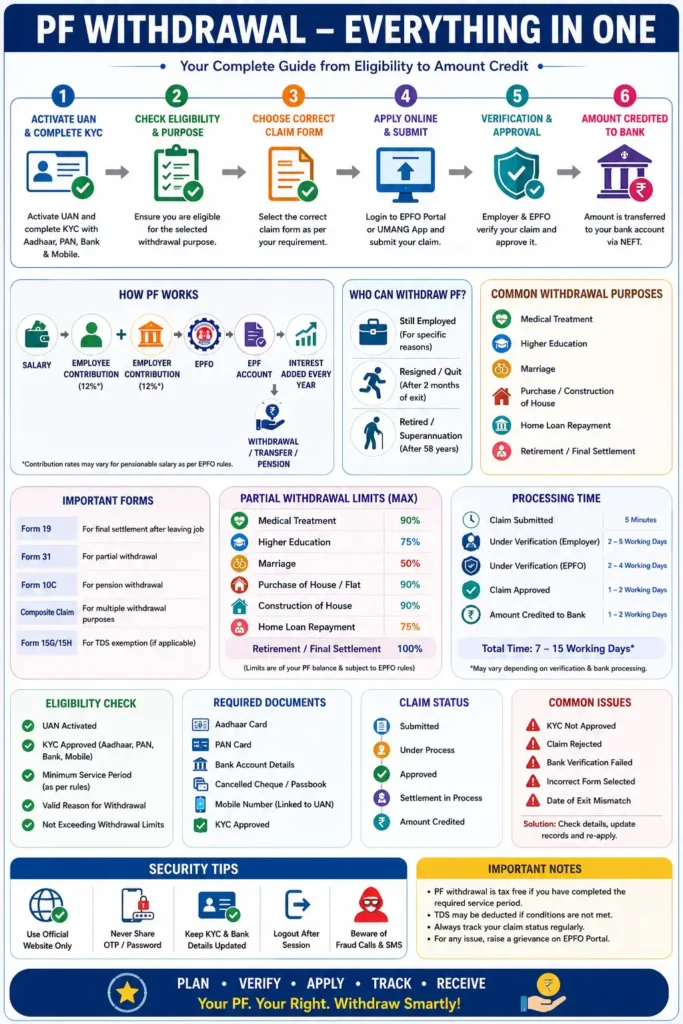
If you decide to proceed with a withdrawal, keep your records updated, rely only on official EPFO resources, and monitor your claim regularly until the payment is credited to your bank account.
We hope this comprehensive guide has answered all your questions about withdrawing your PF amount online. Bookmark this page for future reference, and share it with friends, family, or colleagues who may also benefit from understanding the EPF withdrawal process.
Call-to-Action
If you found this guide helpful, explore our other in-depth EPF and personal finance resources on FundzWise. From checking your PF balance and transferring your account to understanding pension benefits and tax rules, our goal is to provide accurate, easy-to-understand information that helps you make informed financial decisions with confidence.