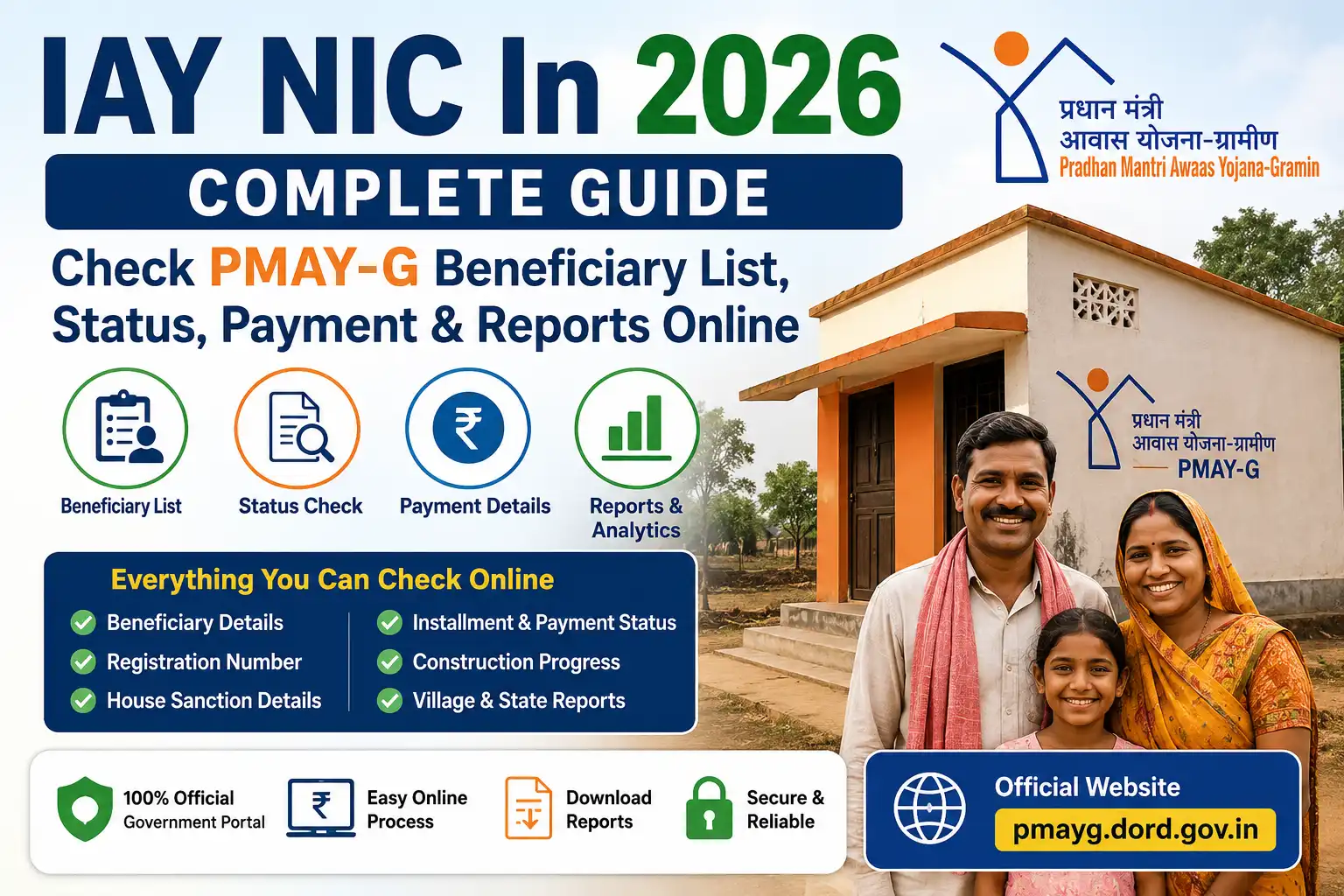
Millions of people across India continue to search for IAY NIC In to check their housing scheme status. Although the original Indira Awaas Yojana (IAY) has been replaced by Pradhan Mantri Awaas Yojana – Gramin (PMAY-G), the keyword remains popular because many beneficiaries were registered under the earlier scheme. Today, the official PMAY-G portal provides all the major services that were once available through the IAY website, including beneficiary search, payment tracking, sanction details, village-wise reports, and construction progress.
Whether you want to verify your name in the beneficiary list, track installment payments, understand the eligibility criteria, or download official reports, this guide explains every important detail in simple English. It is designed for first-time users, existing beneficiaries, students, researchers, and anyone looking for accurate information about the rural housing scheme.
Unlike many short articles available online, this guide covers the complete process, explains every major feature of the portal, highlights common problems and their solutions, and shares practical tips to help you use the system with confidence.
IAY NIC In 2026: Quick Summary
| Particular | Details |
|---|---|
| Scheme Name | Pradhan Mantri Awaas Yojana – Gramin (PMAY-G) |
| Former Scheme Name | Indira Awaas Yojana (IAY) |
| Popular Search Keyword | IAY NIC In |
| Scheme Type | Rural Housing Scheme |
| Launched as IAY | 1985 |
| Renamed to PMAY-G | 2016 |
| Managed By | Ministry of Rural Development |
| Technical Support | National Informatics Centre (NIC) |
| Official Portal | PMAY-G Portal |
| Beneficiary Search | Available |
| Installment Tracking | Available |
| Payment Status | Available |
| Registration Number Search | Available |
| Village Reports | Available |
| Mobile Access | Yes |
| Cost to Use | Free |
What Is IAY NIC In?
IAY NIC In refers to the old online portal of Indira Awaas Yojana (IAY). It was developed to help eligible rural citizens access information related to government housing assistance.
The portal allowed beneficiaries to:
- View approved housing lists
- Check beneficiary information
- Track housing approvals
- Monitor payment releases
- Download reports
- Verify scheme details
Although the original scheme no longer operates under the IAY name, the portal’s services continue through the modern PMAY-G platform. This is why millions of users still search using the keyword “IAY NIC In” instead of PMAY-G.
Why Do People Still Search for IAY NIC In?
Many beneficiaries were approved years ago when the housing scheme was known as Indira Awaas Yojana. Because of this, they continue using the old name while searching online.
There are several reasons behind the popularity of this keyword.
Older Government Documents
Many approval letters, beneficiary documents, and printed records still mention IAY instead of PMAY-G.
Local Awareness
In many villages, people still refer to the scheme as “IAY House” because that is the name they have known for years.
Search Habit
People naturally search for terms they remember. As a result, “IAY NIC In” receives consistent search traffic even though the official scheme now operates under PMAY-G.
Redirected Services
Most services previously available under IAY are now offered through the PMAY-G portal. Users searching for the old portal are ultimately looking for the same information, such as beneficiary details, payment status, and reports.
History of Indira Awaas Yojana
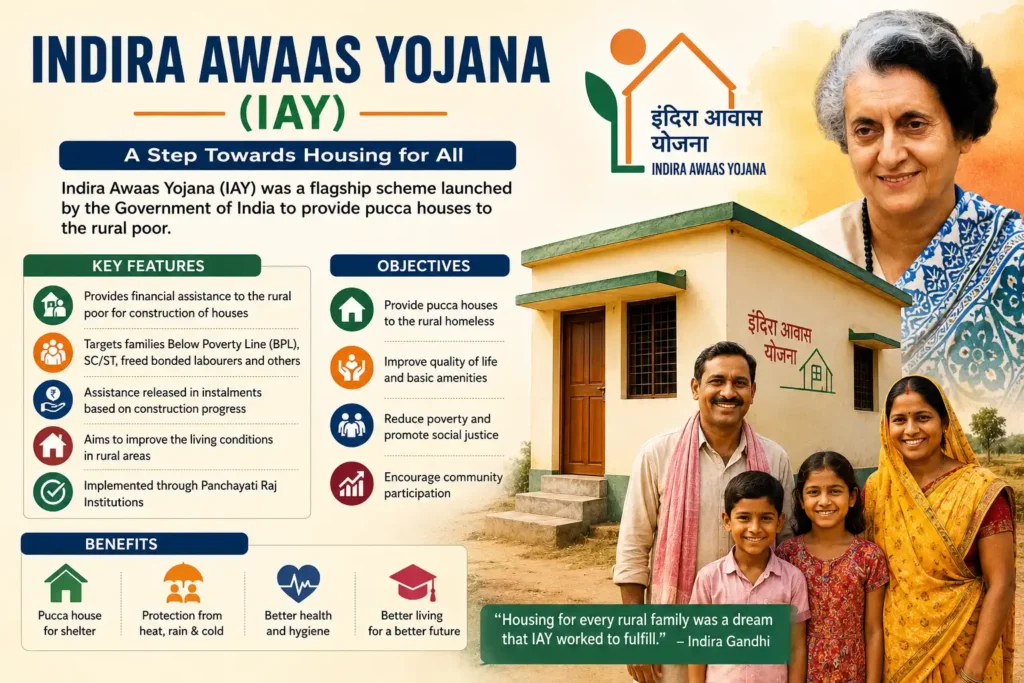
The Government of India launched Indira Awaas Yojana in 1985 to improve housing conditions in rural areas. The scheme focused on helping economically weaker households construct safe and permanent homes.
Initially, the programme primarily supported:
- Scheduled Castes
- Scheduled Tribes
- Freed bonded labourers
- Rural families living below the poverty line
Over time, the scheme expanded and became one of India’s largest rural housing initiatives.
The government continuously reviewed its performance and identified areas where technology could improve transparency, monitoring, and fund distribution. This led to a major transformation in 2016.
Why Was IAY Replaced?
Although Indira Awaas Yojana benefited millions of families, the government wanted to modernize the programme.
Several improvements were introduced.
Better Transparency
Digital monitoring reduced manual errors and improved accountability.
Faster Payments
Beneficiaries started receiving financial assistance directly into their bank accounts through Direct Benefit Transfer (DBT).
Geo-Tagging
Construction progress could now be monitored using geo-tagged photographs.
Better Beneficiary Selection
The new system relied on structured surveys and verification to identify eligible families more accurately.
Digital Reports
Government officials gained access to real-time reports for monitoring progress at the village, block, district, and state levels.
These improvements resulted in the launch of Pradhan Mantri Awaas Yojana – Gramin (PMAY-G).
What Is PMAY-G?
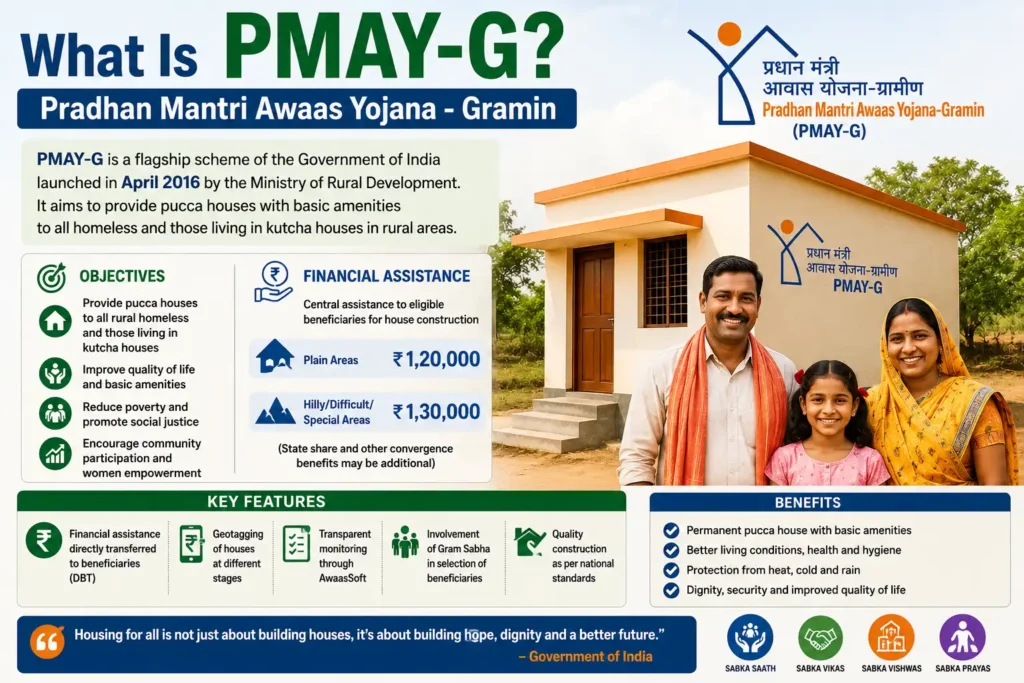
Pradhan Mantri Awaas Yojana – Gramin is the rural housing programme currently implemented by the Government of India.
Its primary objective is to ensure that eligible rural households have access to a safe and permanent house with basic amenities.
The scheme supports beneficiaries by providing financial assistance for house construction while promoting transparency through digital monitoring systems.
Today, PMAY-G offers numerous online services that were not available during the early years of Indira Awaas Yojana.
Objectives of PMAY-G
The scheme aims to achieve several important goals.
Provide Permanent Housing
Eligible rural families receive financial assistance to construct durable houses.
Improve Living Standards
Permanent housing contributes to better health, safety, and overall quality of life.
Increase Transparency
Digital records reduce the possibility of manipulation and improve public trust.
Faster Financial Assistance
Installments are transferred directly to beneficiaries’ bank accounts.
Better Monitoring
Officials can monitor construction progress digitally through geo-tagged images and inspections.
Inclusive Development
The programme supports the government’s broader objective of improving rural infrastructure and reducing housing shortages.
IAY vs PMAY-G vs PMAY Urban
Many users become confused because there are multiple housing schemes with similar names.
The following table explains the differences.
| Feature | IAY | PMAY-G | PMAY-U |
|---|---|---|---|
| Full Name | Indira Awaas Yojana | Pradhan Mantri Awaas Yojana – Gramin | Pradhan Mantri Awaas Yojana – Urban |
| Target Area | Rural | Rural | Urban |
| Current Status | Replaced | Active | Active |
| Launched | 1985 | 2016 | 2015 |
| Digital Monitoring | Limited | Advanced | Advanced |
| Geo-Tagging | No | Yes | Yes |
| Online Reports | Basic | Comprehensive | Comprehensive |
| Direct Benefit Transfer | Limited | Yes | Yes |
| Construction Monitoring | Manual | Digital | Digital |
Understanding this distinction helps users visit the correct portal based on where they live.
Major Features of the PMAY-G Portal
The modern portal offers far more features than the original IAY website.
Beneficiary Search
Users can search approved beneficiaries using registration numbers or location details.
Payment Tracking
Beneficiaries can monitor installment releases and payment history.
Village Reports
The system generates detailed reports for every village.
District Reports
Officials and citizens can review district-wise implementation.
Panchayat Reports
Local governance reports help track housing approvals at the Panchayat level.
Construction Monitoring
The portal records construction progress using digital verification.
Permanent Wait List
Eligible households waiting for approval can be identified through official records.
Financial Progress
Users can monitor sanctioned amounts and installment releases.
Mobile Compatibility
The portal works on smartphones, tablets, laptops, and desktop computers.
Free Access
Anyone can access publicly available beneficiary information without paying any fee.
Complete Portal Walkthrough
Many first-time users feel overwhelmed when they open the PMAY-G portal. Understanding each section makes navigation much easier.
Home Page
The home page displays quick access to major services.
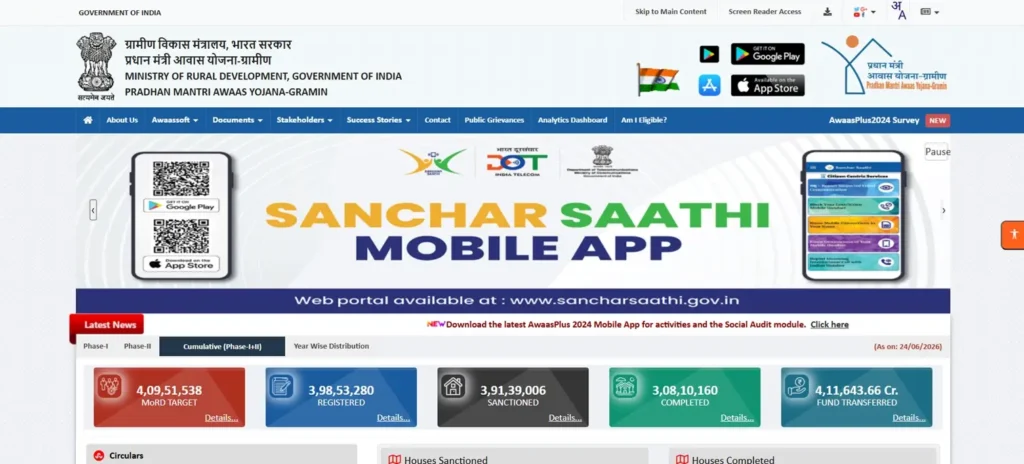
It usually includes:
- Scheme information
- Beneficiary search
- Reports
- Dashboard
- Latest updates
- Notifications
- Quick links
Navigation Menu
The top navigation bar helps users move between different services.
Each option serves a specific purpose.
Reports Section
This is one of the most frequently visited sections.
It allows users to generate:
- State reports
- District reports
- Block reports
- Panchayat reports
- Village reports
- Beneficiary reports
- Financial reports
Search Section
This feature allows users to locate approved beneficiaries quickly.
Dashboard
The dashboard provides an overview of the scheme’s implementation.
It generally includes statistics related to:
- Houses sanctioned
- Houses completed
- Funds released
- Beneficiaries covered
- Construction progress
Help Resources
Many official pages include instructions and guidance for beneficiaries.
Every Major Menu Explained
Understanding each menu saves time and reduces confusion.
Stakeholders
This section provides information for beneficiaries, government officials, and implementing agencies.
AwaasSoft
AwaasSoft is the management system used for planning, monitoring, fund management, and reporting.
It supports digital administration of the housing programme.
AwaasApp
AwaasApp assists field officials in collecting geo-tagged photographs and monitoring construction progress.
Beneficiary Search
This menu helps users search beneficiary details using registration numbers or location-based filters.
Reports
Users can generate detailed implementation reports at multiple administrative levels.
FTO Tracking
Fund Transfer Order tracking allows beneficiaries to monitor payment processing.
Geo Tag
This feature records photographs of houses during different stages of construction.
Dashboard
The dashboard displays national, state, district, and local implementation statistics in an easy-to-understand format.
Understanding the Dashboard
The dashboard serves as the central information hub for the entire scheme.
It helps government officials and citizens understand overall programme performance.
Common information includes:
- Total beneficiaries
- Houses sanctioned
- Houses under construction
- Completed houses
- Funds released
- Pending approvals
- Physical progress
- Financial progress
These statistics are updated regularly to improve transparency.
Who Can Use the Portal?
The portal is designed for multiple types of users.
Beneficiaries
They can check approval status, payment history, and construction progress.
Government Officials
Officials use the portal for planning, monitoring, inspections, and reporting.
Researchers
Researchers can study rural housing development using publicly available reports.
Journalists
Media professionals often use official reports while covering housing-related stories.
Students
Students preparing project reports can access verified government data.
Benefits of Using the Portal
The online platform offers several advantages over traditional paper-based systems.
- Easy access from anywhere
- Free beneficiary verification
- Transparent payment tracking
- Faster report generation
- Reduced paperwork
- Better monitoring
- Improved accountability
- Digital construction verification
- Accurate beneficiary records
- State-wise implementation statistics
Information Available Through Beneficiary Search
Once a beneficiary is located, the portal may display several important details.
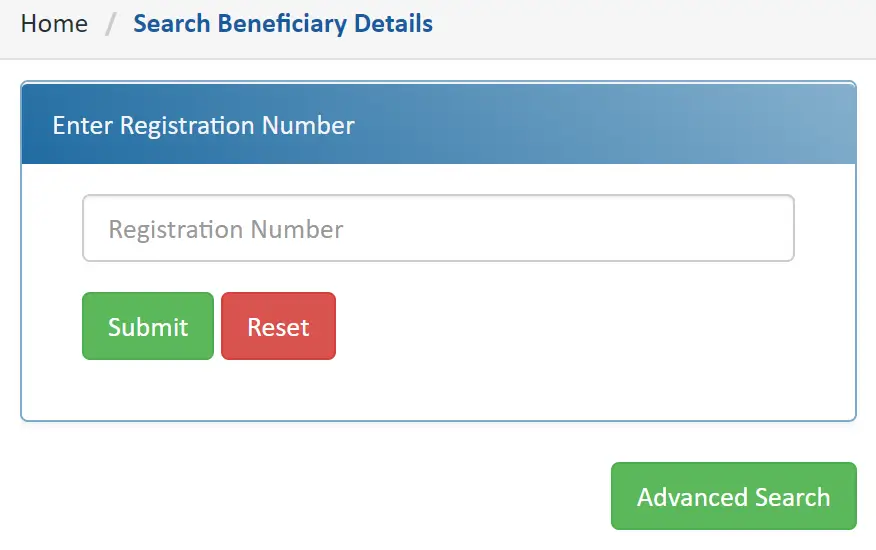
These include:
- Beneficiary Name
- Registration Number
- Father’s or Husband’s Name
- State
- District
- Block
- Gram Panchayat
- Village
- House Status
- Approval Date
- Installment Details
- Payment History
- Construction Stage
- Inspection Status
- Geo-Tag Verification
- House Completion Status
Understanding these details helps beneficiaries track the progress of their approved houses and verify that official records are accurate.
How to Check the IAY NIC In Beneficiary List Online
One of the biggest reasons people search for IAY NIC In is to verify whether their name appears in the official beneficiary list. The process is simple once you know where to look.
The beneficiary list is available online and can be searched using your location or registration details.
Method 1: Search Using Beneficiary Registration Number
This is the quickest and most accurate method.
Step 1: Visit the Official PMAY-G Portal
Open the official PMAY-G website in your browser.
Recommended Rich Media: Screenshot of the PMAY-G homepage highlighting the Beneficiary Search option.
Step 2: Open the Beneficiary Search Section
Navigate to the beneficiary search page.
You will find an option similar to:
Search Beneficiary
Step 3: Enter Your Registration Number
Type your PMAY-G or IAY registration number carefully.
Avoid adding extra spaces or special characters.
Step 4: Complete the Verification
If the portal asks for a CAPTCHA, enter it correctly.
Step 5: Click Submit
Within a few seconds, your beneficiary details will appear if the registration number is valid.
You can usually view:
- Beneficiary Name
- Registration Number
- Father’s/Husband’s Name
- Category
- Village
- Gram Panchayat
- Block
- District
- State
- House Status
- Installment Details
- House Completion Status
Method 2: Search Without Registration Number
Many beneficiaries lose their registration number after several years.
Fortunately, you can still locate your information.
Step 1
Open the Reports section.
Step 2
Choose:
Beneficiary Details for Verification
Step 3
Select:
- Financial Year
- State
- District
- Block
- Gram Panchayat
- Village
Step 4
Click Submit.
The portal generates a complete beneficiary list for your selected village.
You can search manually for your name.
Recommended Rich Media: Screenshot showing the village selection page.
Method 3: Search by Advanced Filters
The portal also allows searches using administrative filters.
Available filters include:
- State
- District
- Block
- Panchayat
- Village
- Financial Year
This method is useful for Panchayat officials and researchers.
Understanding the Beneficiary Search Result
Many users do not understand the information displayed after searching.
Here is what each field means.
| Field | Meaning |
|---|---|
| Registration Number | Unique beneficiary identification number |
| Beneficiary Name | Name of approved applicant |
| Father’s/Husband’s Name | Family identification |
| Category | Social category |
| Village | Beneficiary location |
| Panchayat | Local governing body |
| House Status | Current construction stage |
| Installment Released | Payment already transferred |
| Pending Installment | Future payment |
| Geo Tag | Construction verification |
| Completion Status | Finished or under construction |
Understanding these fields helps beneficiaries monitor their applications more effectively.
How to Check PMAY-G Payment Status
After house approval, beneficiaries receive financial assistance in multiple installments.
Checking payment status is one of the most searched features on the portal.
Step 1
Search your beneficiary details.
Step 2
Open your beneficiary profile.
Step 3
Locate:
Financial Progress
or
Installment Details
Step 4
Review each installment.
The portal generally displays:
- Installment Number
- Amount Released
- Release Date
- Fund Transfer Status
- Bank Processing Status
What Does Payment Status Mean?
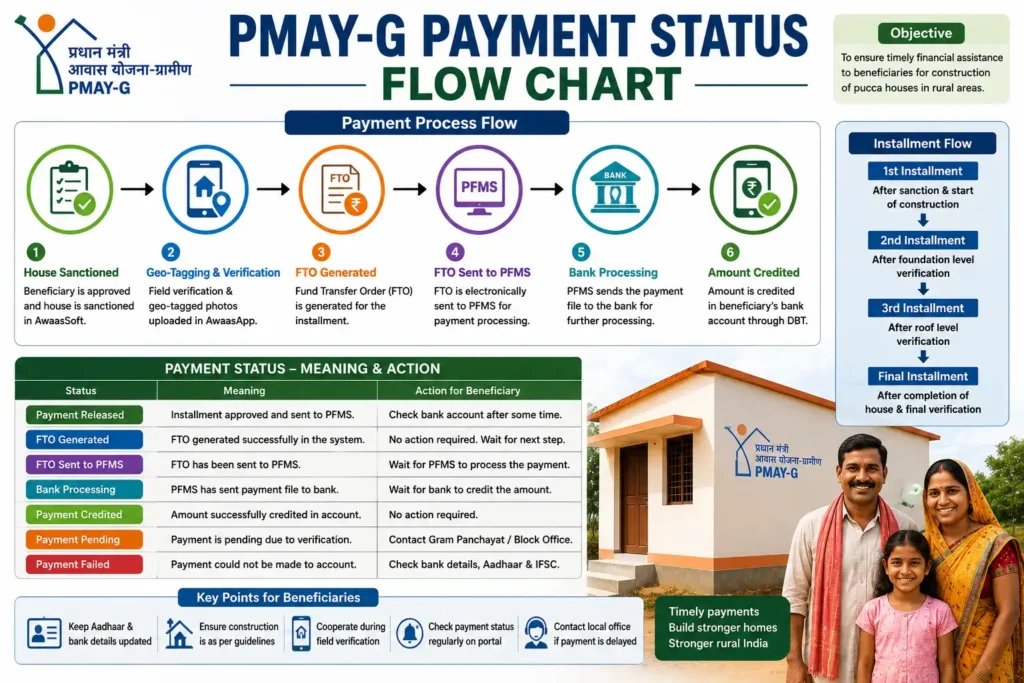
You may encounter several payment statuses.
Payment Released
The government has approved and transferred the installment.
Under Processing
The payment is currently being processed.
Pending Verification
Construction verification has not yet been completed.
Awaiting Geo Tag
Officials must upload construction photographs before the next installment.
Payment Failed
The transfer could not be completed due to issues such as bank account or Aadhaar mismatches.
Understanding Installment Releases
PMAY-G financial assistance is released in stages.
Each installment depends on construction progress.
| Installment | Construction Stage |
|---|---|
| First | House approved and construction begins |
| Second | Foundation completed |
| Third | Roof level completed |
| Final (where applicable) | House fully completed and verified |
The exact release pattern may vary by state and project guidelines.
How to Track Construction Progress
The portal allows beneficiaries to monitor construction activity.
Common construction stages include:
- House Approved
- Foundation Started
- Plinth Completed
- Wall Construction
- Roof Completed
- Finishing Work
- House Completed
- Verified
Every stage must usually be verified before the next installment is released.
What Is Geo Tagging?
Geo-tagging is one of the most important improvements introduced under PMAY-G.
Instead of relying only on paper records, officials capture photographs of houses using GPS-enabled mobile devices.
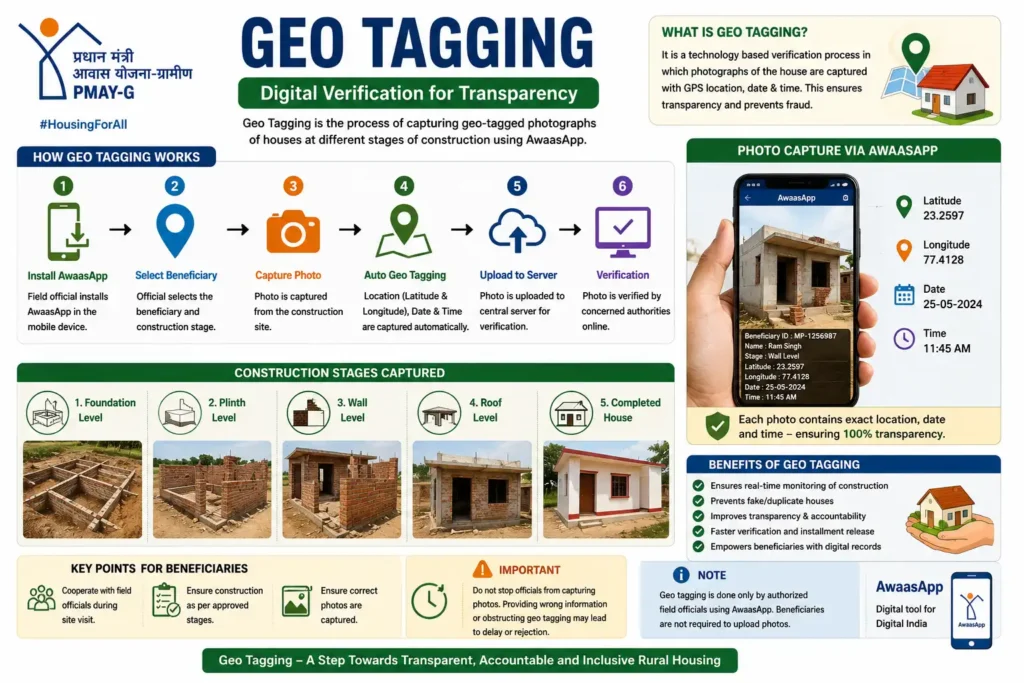
Each photograph includes:
- Location
- Date
- Time
- Construction Stage
This system improves transparency and reduces fraud.
Benefits of Geo Tagging
Geo-tagging offers several advantages.
Better Transparency
Officials can verify actual construction.
Reduced Fraud
Fake housing claims become much harder.
Faster Verification
Inspection reports reach higher authorities quickly.
Digital Record Keeping
Every construction stage is documented.
Faster Installment Release
Verified photographs speed up payment approval.
What Is FTO Tracking?
FTO stands for Fund Transfer Order.
Once an installment is approved, the government generates an FTO.
The FTO moves through several stages before the money reaches the beneficiary’s bank account.
FTO Processing Stages
| Stage | Meaning |
|---|---|
| FTO Generated | Payment approved |
| Sent to PFMS | Forwarded for processing |
| Bank Processing | Payment moving to bank |
| Credited | Money transferred successfully |
If your payment appears delayed, checking the FTO status can help identify where it is currently held.
What Is PFMS?
PFMS stands for Public Financial Management System.
It is responsible for processing government payments.
PMAY-G uses PFMS to transfer financial assistance directly to beneficiaries’ bank accounts.
Understanding Physical Progress
Physical progress refers to the actual construction work completed on the house.
The portal records progress such as:
- Foundation
- Walls
- Roofing
- Plastering
- Completion
Officials update these stages after field inspections.
Understanding Financial Progress
Financial progress shows the amount released by the government.
It generally includes:
- Total sanctioned amount
- Installment released
- Remaining balance
- Payment dates
- Fund transfer status
Complete Guide to Reports Available on the Portal
The PMAY-G portal provides numerous reports.
Each report serves a different purpose.
Beneficiary Report
Shows individual beneficiary details.
Useful for:
- Citizens
- Panchayats
- Officials
Village Report
Displays:
- Total beneficiaries
- Houses completed
- Houses under construction
- Pending approvals
Panchayat Report
Shows implementation at Gram Panchayat level.
Block Report
Provides housing statistics across all Panchayats in the block.
District Report
Displays district-wide implementation.
Useful for administrative planning.
State Report
Shows statewide housing progress.
Researchers often use this report.
Financial Report
Displays:
- Funds sanctioned
- Funds released
- Remaining funds
Physical Progress Report
Shows construction progress across all beneficiaries.
Geo Tag Report
Lists verified construction photographs.
Permanent Wait List
Displays households waiting for approval.
MIS Reports
Management Information System reports provide detailed administrative data for monitoring and evaluation.
How to Download PMAY-G Reports
Downloading reports is straightforward.
Step 1
Open the Reports section.
Step 2
Select the report you need.
Step 3
Choose:
- Financial Year
- State
- District
- Block
- Panchayat
Step 4
Click Generate Report.
Step 5
Download or print the report if the option is available.
These reports are useful for beneficiaries, government officials, NGOs, researchers, and journalists.
State-Wise Beneficiary Reports
The portal provides reports for every state and union territory.
Popular searches include:
- Uttar Pradesh
- Bihar
- Madhya Pradesh
- Rajasthan
- Odisha
- Jharkhand
- West Bengal
- Chhattisgarh
- Assam
- Maharashtra
- Gujarat
- Karnataka
- Tamil Nadu
- Kerala
- Andhra Pradesh
- Telangana
- Punjab
- Haryana
- Himachal Pradesh
- Uttarakhand
Users can narrow their search to the district, block, Panchayat, and village level.
How to Print Beneficiary Details
Printing your beneficiary information is helpful when visiting government offices.
Follow these steps:
- Search your beneficiary record.
- Open the details page.
- Use the Print option if available, or use your browser’s print feature.
- Save a PDF copy for future reference.
Keeping a printed record can make verification easier during field inspections or bank visits.
Eligibility Criteria for PMAY-G (Formerly IAY)
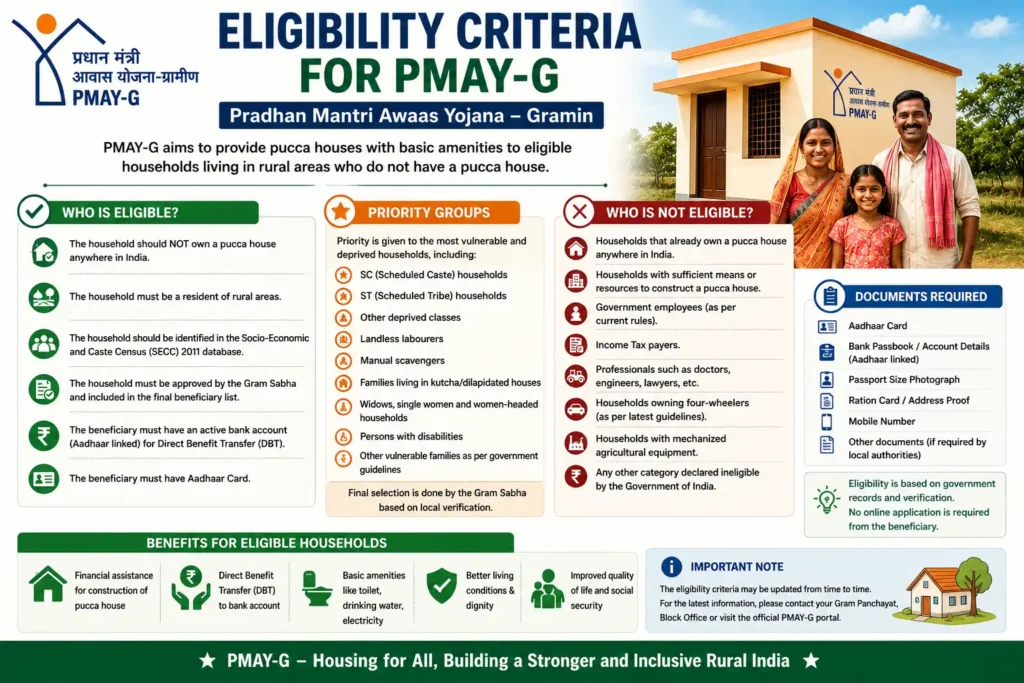
One of the most common questions people ask is whether they qualify for assistance under the scheme. Unlike many government programmes, PMAY-G does not accept beneficiaries solely through a simple online application. Eligible households are identified through official surveys, verification, and approval by local authorities.
To receive assistance, a household must satisfy the eligibility criteria prescribed by the Government of India.
Generally, the scheme prioritizes families that:
- Live in rural areas.
- Do not own a permanent (pucca) house.
- Are identified in the official socio-economic survey.
- Meet the eligibility conditions approved by the Gram Sabha.
- Complete all required verification procedures.
Eligibility is based on government records rather than self-declaration.
Who Gets Priority Under the Scheme?
Although every case is verified individually, priority is generally given to households that face severe housing challenges.
These may include:
- Homeless families
- Families living in kutcha houses
- Scheduled Castes (SC)
- Scheduled Tribes (ST)
- Widows
- Persons with disabilities
- Landless labourers
- Families with no adult earning member
- Other vulnerable rural households identified through official surveys
The final beneficiary list is prepared only after local verification.
Who May Not Be Eligible?
Certain households generally fall outside the scheme’s eligibility criteria.
Examples include families that:
- Already own a permanent house.
- Have sufficient housing facilities.
- Do not satisfy the approved survey criteria.
- Are not verified by the Gram Sabha.
- Fall outside the approved beneficiary database.
Eligibility rules may be updated by the government from time to time.
How Beneficiaries Are Selected
Many people believe they can simply register online and receive housing assistance. In reality, beneficiary selection follows a structured process to ensure fairness and transparency.
Step 1: Socio-Economic Survey
Government agencies conduct surveys to identify rural households based on predefined parameters.
Step 2: Preparation of Eligible Household List
The survey data is compiled to prepare a list of potentially eligible households.
Step 3: Gram Sabha Verification
The Gram Sabha verifies the survey findings and confirms eligible beneficiaries.
Step 4: Approval by Authorities
After verification, the list is approved by the competent authorities.
Step 5: Beneficiary Registration
Each approved household receives a unique registration number.
Step 6: House Sanction
Financial assistance is sanctioned for eligible beneficiaries.
Step 7: Construction Begins
Construction starts after the first installment is released.
Beneficiary Selection Flow
Government Survey
        ↓
Eligible Household List
        ↓
Gram Sabha Verification
        ↓
Approval
        ↓
Registration Number
        ↓
House Sanction
        ↓
First Installment
        ↓
Construction Begins
Recommended Rich Media: Create a vertical infographic showing the beneficiary selection workflow.
Documents Required for Verification
The exact document requirements may vary depending on the beneficiary’s situation and state guidelines. However, the following documents are commonly required during verification.
Identity Documents
- Aadhaar Card
- Voter ID
- PAN Card (if applicable)
Address Proof
- Aadhaar
- Ration Card
- Official residence records
Bank Details
- Bank Passbook
- Account Number
- IFSC Code
Mobile Number
A valid mobile number linked to the beneficiary helps receive updates regarding payments and verification.
Photographs
Officials may require photographs during inspections and geo-tagging.
Other Supporting Documents
Depending on the case, additional documents may be requested by local authorities.
Importance of Aadhaar Linking
Aadhaar plays a significant role in ensuring transparency.
Benefits include:
- Correct beneficiary identification
- Reduced duplication
- Faster payment processing
- Better verification
- Secure Direct Benefit Transfer (DBT)
If Aadhaar details do not match the beneficiary records, payment delays may occur.
Importance of Bank Account Verification
Financial assistance is transferred directly to the beneficiary’s bank account.
Ensure that:
- The account is active.
- The beneficiary’s name matches official records.
- Aadhaar is linked if required.
- IFSC details are correct.
Incorrect banking information is one of the most common reasons for delayed payments.
Financial Assistance Under PMAY-G
The scheme provides financial support to help eligible rural households construct permanent homes.
The amount depends on the geographical location.
| Area | Financial Assistance |
|---|---|
| Plain Areas | ₹1.20 Lakh |
| Hilly Areas | ₹1.30 Lakh |
| Difficult and Special Areas | As per applicable government norms |
Apart from housing assistance, beneficiaries may also receive support under convergent schemes for sanitation, wages, and other approved components, subject to eligibility.
How Is the Money Released?
Financial assistance is not paid in a single installment.
Instead, it is released in stages based on construction progress.
Stage 1
House approval and commencement of construction.
Stage 2
Foundation completed.
Stage 3
Wall construction completed.
Stage 4
Roof completed.
Final Verification
Construction completed and verified.
Each stage generally requires field verification before the next installment is released.
Complete Construction Timeline
Understanding the construction process helps beneficiaries know what to expect.
Survey
Officials identify eligible households.
↓
Verification
Gram Sabha confirms beneficiary eligibility.
↓
House Approval
Government sanctions assistance.
↓
Registration Number Generated
Unique beneficiary ID assigned.
↓
First Installment Released
Construction work begins.
↓
Foundation Completed
Officials verify progress.
↓
Geo Tag Uploaded
Photographs submitted through AwaasApp.
↓
Second Installment Released
Further construction begins.
↓
Wall Construction
Inspection conducted.
↓
Roof Completed
Additional verification.
↓
Final Installment
Remaining financial assistance released.
↓
House Completed
Construction finished.
↓
Final Inspection
Officials confirm successful completion.
Recommended Rich Media: Full-width timeline infographic illustrating the house construction journey.
What Is AwaasApp?
AwaasApp is the official mobile application used by field officials for monitoring PMAY-G construction.
The app helps:
- Capture geo-tagged photographs.
- Monitor construction stages.
- Upload inspection reports.
- Improve transparency.
- Speed up verification.
Beneficiaries generally do not need to operate AwaasApp themselves, but they should cooperate during inspections.
Benefits of Digital Monitoring
Digital monitoring has significantly improved the implementation of rural housing schemes.
Reduced Fraud
Only verified houses receive installment payments.
Faster Inspections
Officials can upload data instantly.
Better Transparency
Construction progress becomes visible to higher authorities.
Accurate Reporting
Digital records reduce manual errors.
Improved Accountability
Every stage is documented with evidence.
Can Beneficiaries Use a Mobile Phone?
Yes.
The PMAY-G portal is mobile-friendly.
Beneficiaries can use smartphones to:
- Search beneficiary details.
- View reports.
- Track payment status.
- Monitor construction progress.
A stable internet connection improves the browsing experience.
Offline Verification Methods
Not every beneficiary has internet access. The government therefore provides several offline verification options.
Gram Panchayat Office
This is usually the first place to visit.
Officials can help verify:
- Beneficiary status
- Registration number
- House approval
- Installment details
Block Development Office (BDO)
The Block office maintains detailed records for all approved beneficiaries.
You can seek assistance regarding:
- Pending verification
- Payment delays
- Missing beneficiary records
- Construction issues
Rural Development Office
District Rural Development authorities oversee implementation at a broader level.
Complex issues may be resolved here.
Common Service Centre (CSC)
Common Service Centres play an important role in providing digital services to rural citizens.
CSC operators can assist with:
- Beneficiary searches
- Report downloads
- Status verification
- Printing records
- Basic guidance
These centres are especially useful for people who are not comfortable using computers.
How CSC Centres Help Beneficiaries
Many rural citizens rely on Common Service Centres because they offer affordable digital assistance.
Services commonly provided include:
- Online beneficiary search
- Registration number lookup
- Report printing
- Payment verification
- Government scheme guidance
Although CSC operators assist with online services, they cannot approve or reject beneficiaries.
What If Your Name Is Missing?
If your name does not appear in the beneficiary list, do not panic.
Several reasons could explain this situation.
Verification Pending
Local authorities may still be completing verification.
Survey Data Updated
The records may not yet reflect recent changes.
Incorrect Search Details
Verify the spelling of your village and other details.
Administrative Delay
Updates may take time to appear on the portal.
If the issue persists, contact your Gram Panchayat or Block office for assistance.
Common Reasons for Payment Delays
Beneficiaries often worry when installment payments are delayed.
The most common reasons include:
- Aadhaar mismatch
- Incorrect bank account details
- Construction stage not verified
- Geo-tag photographs pending
- Inspection incomplete
- Technical processing delays
- Verification pending at local authorities
Resolving these issues promptly can help avoid further delays.
How to Keep Your Records Updated
Beneficiaries should ensure that all information remains accurate.
Regularly verify:
- Aadhaar details
- Bank account information
- Mobile number
- Address records
- Beneficiary name spelling
Small errors in official records can delay payments or verification.
Tips for Beneficiaries
Follow these best practices throughout the process.
- Keep your registration number safe.
- Maintain copies of all documents.
- Cooperate during inspections.
- Complete construction according to approved stages.
- Avoid sharing personal information with unknown individuals.
- Use only official government portals and offices for verification.
- Keep your bank account active.
- Preserve payment receipts and inspection records.
These simple practices can make the entire housing assistance process smoother and help prevent unnecessary delays.
Common Error Messages on the IAY NIC In / PMAY-G Portal
While searching for beneficiary details or checking payment status, users may encounter different error messages. Most of these issues can be resolved by following a few simple steps.
Registration Number Not Found
This is one of the most common errors.
Possible Reasons
- Registration number entered incorrectly.
- The beneficiary record has not yet been updated.
- Extra spaces or special characters were added.
- The registration belongs to another financial year.
How to Fix It
- Re-enter the registration number carefully.
- Check the number from your approval letter.
- Search using your village instead.
- Contact your Gram Panchayat if the issue continues.
Beneficiary Name Not Found
Sometimes your name may not appear in the beneficiary list.
Possible Reasons
- Verification is pending.
- Survey information is still being updated.
- Incorrect village or Panchayat selected.
- Beneficiary not approved yet.
Solution
Verify your details with the Gram Panchayat or Block Development Office.
Invalid CAPTCHA
CAPTCHA errors occur frequently on government websites.
How to Solve It
- Refresh the page.
- Enter uppercase and lowercase letters correctly.
- Avoid typing extra spaces.
- Generate a new CAPTCHA if needed.
Website Is Not Loading
Government portals occasionally become slow because of high traffic.
Possible Solutions
- Refresh the webpage.
- Try another browser.
- Clear your browser cache.
- Use a stable internet connection.
- Access the portal during non-peak hours.
Payment Pending
Many beneficiaries become concerned when payment remains pending.
Possible Reasons
- Construction stage not verified.
- Geo-tagging incomplete.
- Inspection pending.
- Bank verification pending.
- Technical processing delay.
Do not panic. Payment generally proceeds after the required verification is completed.
Aadhaar Verification Failed
Incorrect Aadhaar information may delay payments.
Common Reasons
- Name mismatch
- Date of birth mismatch
- Incorrect Aadhaar number
- Aadhaar not linked with bank account
Visit the concerned authority if your Aadhaar information needs correction.
Bank Account Verification Failed
Incorrect banking information can prevent successful payment.
Verify:
- Account Number
- IFSC Code
- Beneficiary Name
- Active Bank Account
Even a small spelling mistake may delay payment.
House Verification Pending
Before every installment, officials verify the completed construction stage.
Pending verification usually indicates that field inspection has not yet been completed.
No further action may be required unless the local office contacts you.
Common Problems and Their Solutions
| Problem | Possible Solution |
|---|---|
| Registration number not found | Verify number and search again |
| Name missing | Contact Gram Panchayat |
| Payment delayed | Wait for verification |
| Aadhaar mismatch | Correct Aadhaar details |
| Bank error | Verify bank account |
| Website slow | Try later |
| Geo-tag pending | Wait for inspection |
| Installment delayed | Contact Block Office |
Troubleshooting Flowchart
Unable to Find Beneficiary?

        ↓

Check Registration Number

        ↓

Correct?

     Yes      No
      ↓        ↓
 Search Again  Correct Number

        ↓

Still Not Found?

        ↓

Search by Village

        ↓

Still Missing?

        ↓

Visit Gram Panchayat

        ↓

Block Development Office

        ↓

District Rural Development Office
Recommended Rich Media: Design this as a decision-tree infographic for quick troubleshooting.
Safety Tips While Using the Portal
As the scheme is popular, fraudsters often target beneficiaries. Follow these safety tips to protect yourself.
Use Only Official Government Websites
Avoid websites that promise guaranteed approval or ask for payment.
Never Share OTP
Government officials will never ask for your banking OTP.
Do Not Pay Middlemen
Checking beneficiary status is completely free.
Verify Before Clicking Links
Always confirm that you are using the official PMAY-G portal.
Protect Personal Information
Never share:
- Aadhaar OTP
- Bank PIN
- ATM PIN
- Internet Banking Password
- UPI PIN
Common Online Scams
Fraudsters may contact beneficiaries pretending to be government officials.
Be cautious if someone:
- Promises faster approval.
- Asks for processing fees.
- Requests bank passwords.
- Offers guaranteed housing.
- Asks for OTP verification.
Government departments never request money for beneficiary verification.
Best Practices for Beneficiaries
Following these practices helps avoid unnecessary delays.
- Save your registration number.
- Keep photocopies of important documents.
- Update your mobile number if it changes.
- Maintain an active bank account.
- Attend inspections when required.
- Complete construction according to approved stages.
- Preserve all payment records.
Glossary of Important Terms
Understanding common terms makes the portal easier to use.
IAY
Indira Awaas Yojana, the former rural housing scheme.
PMAY-G
Pradhan Mantri Awaas Yojana – Gramin.
NIC
National Informatics Centre.
Beneficiary
The approved person receiving housing assistance.
Registration Number
Unique identification number assigned to each beneficiary.
Gram Panchayat
Local village governing body responsible for verification.
Block
Administrative division comprising multiple Gram Panchayats.
District
Administrative unit containing several blocks.
Installment
A stage-wise payment released for house construction.
Geo Tag
GPS-enabled photograph used for monitoring construction.
FTO
Fund Transfer Order generated before payment.
DBT
Direct Benefit Transfer, through which financial assistance is deposited directly into the beneficiary’s bank account.
PFMS
Public Financial Management System used for processing government payments.
Permanent Wait List
List of eligible households awaiting approval.
AwaasSoft
Official software used to manage PMAY-G.
AwaasApp
Official mobile application used by field officials for monitoring construction.
Latest PMAY-G Updates for 2026
The Government of India continues to strengthen PMAY-G through digital improvements and expanded implementation.
Recent areas of focus include:
- Faster beneficiary verification.
- Improved online dashboards.
- Better geo-tag monitoring.
- Increased transparency in payment processing.
- Enhanced reporting tools.
- Digital construction tracking.
- Improved Direct Benefit Transfer mechanisms.
Since government policies may change, always refer to official announcements for the latest information.
Official Contact and Support
If you face issues that cannot be resolved online, contact your local authorities.
Gram Panchayat
For:
- Beneficiary verification
- Village records
- Local guidance
Block Development Office (BDO)
For:
- Registration issues
- Installment delays
- Verification status
District Rural Development Agency (DRDA)
For:
- Escalated complaints
- District-level implementation
- Administrative support
Common Service Centre (CSC)
For:
- Online beneficiary search
- Report downloads
- Printing documents
- Digital assistance
Always carry your registration number and identity documents when visiting these offices.
Expert Tips to Receive Installments Without Delay
Housing assistance is released only after successful verification. The following tips can help ensure a smooth process.
- Complete construction stage by stage.
- Cooperate with inspection teams.
- Ensure geo-tag photographs are uploaded on time.
- Keep your Aadhaar and bank details updated.
- Respond promptly if officials request additional information.
- Monitor your beneficiary status regularly.
Frequently Asked Questions
1. Is IAY still available?
No. Indira Awaas Yojana has been replaced by PMAY-G. However, many users still search using the old name.
2. Can I search using my registration number?
Yes. The registration number is the easiest way to locate your beneficiary record.
3. Can I search without a registration number?
Yes. You can search using your state, district, block, Gram Panchayat, and village.
4. Is checking beneficiary status free?
Yes. The official portal provides this service free of charge.
5. Can I check payment status online?
Yes. Payment and installment details are available through the beneficiary profile.
6. How many installments are released?
The number of installments depends on the applicable implementation guidelines and construction milestones.
7. Why is my payment delayed?
Common reasons include pending verification, geo-tagging, Aadhaar mismatch, or bank account issues.
8. Can I update my bank details online?
Generally, such changes are handled through the concerned authorities. Contact your Gram Panchayat or Block office for guidance.
9. Can I use my mobile phone?
Yes. The PMAY-G portal is mobile-friendly.
10. What if my Aadhaar details are incorrect?
Correct them through the appropriate Aadhaar update process and ensure your beneficiary records are updated if required.
11. Is there an official mobile application?
Yes. AwaasApp is used for field monitoring, primarily by officials.
12. Can I download reports?
Yes. Multiple reports are available through the Reports section.
13. Can I print beneficiary details?
Yes. You can print or save your beneficiary information after searching.
14. Who verifies construction?
Authorized government officials conduct field inspections and upload geo-tagged photographs.
15. What is the Permanent Wait List?
It is the list of eligible households awaiting approval under the scheme.
16. What is a Geo Tag?
It is a GPS-enabled photograph that verifies construction progress.
17. What is FTO?
FTO stands for Fund Transfer Order, which is generated before funds are transferred to the beneficiary.
18. Can two members of the same family receive benefits?
Eligibility is determined according to official guidelines and household records. Duplicate benefits are generally not permitted.
19. Can I visit a CSC for help?
Yes. Common Service Centres assist beneficiaries with online services.
20. Where should I complain if I face problems?
You should first contact your Gram Panchayat. If necessary, escalate the matter to the Block Development Office or District Rural Development Agency.
Final Thoughts
Although millions of users still search for IAY NIC In, the services they need are now provided through Pradhan Mantri Awaas Yojana – Gramin (PMAY-G). The modern portal offers a transparent and user-friendly way to check beneficiary details, monitor installment payments, download official reports, and track house construction.
If you are an existing beneficiary, keep your registration number, Aadhaar details, and bank account information updated. Check your status regularly, cooperate during inspections, and rely only on official government sources for information.
By understanding how the portal works and following the guidance shared in this article, you can confidently track your application and make full use of the services available under India’s flagship rural housing programme.